
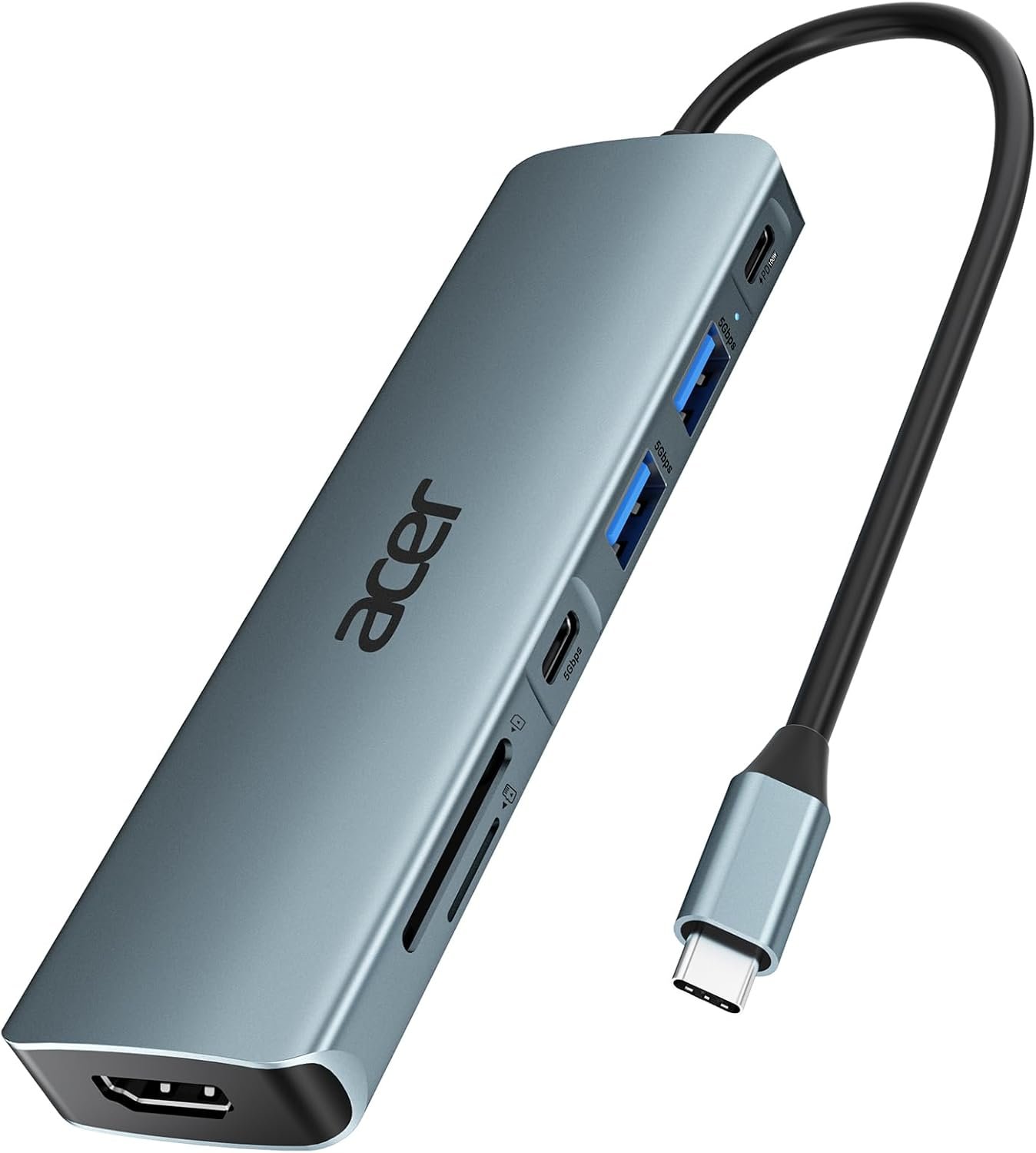


Acer USB C Hub, 7 in 1 Multi-Port Adapter for Laptop, 4K, HDMI Splitter with 2 USB A 3.1 & Type-C to HDMI Data Port, PD 100W Charging, SD Card Reader for Computer, Desktop, Space Grey
Original price was: $24.99.$17.98Current price is: $17.98.


Product description


1 Crystal-Clear 4K HDMI
2 Mirror&Extend Mode
3 5Gbps Fast Transfer Data
4 100W PD Fast Charging
5 SD&TF Card Reader


(✘)Not compatible with iPhone/iPad equipped with Lightning port
(✘)Not compatible with devices that don’t support the protocol of DP Alt Mode.
(✔) Compatible with USB-C 3.1 or Thunderbolt 3/4 port interfaces that support “DisplayPort Alternate Mode”.
Compatible Devices (INCOMPLETE LIST):
✔ Apple iPhone 15 Series; MacBook Pro (Late 2016) and newer, MacBook Air (Late 2018) and newer; MacBook ( Late 2015) and newer; Mac Studio(2022), Mac Mini (Late 2018) and newer; ✔ iPad Pro 12.9“ 6/5/4/3, iPad Pro 11″ 3/2/1 ; iPad Air 5/4; iPad mini 6; iPad 10c ✔ Others iPhone 15 Series; MacBook Pro (Late 2016) and newer, MacBook Air (Late 2018) and newer; MacBook ( Late 2015) and newer; Mac Studio(2022), Mac Mini (Late 2018) and newer; ✔ iPad Pro 12.9“ 6/5/4/3, iPad Pro 11″ 3/2/1 ; iPad Air 5/4; iPad mini 6; iPad 10 ✔ Samsung Galaxy S22 Ultra/S20/ S20+/ S20 Ultra/ S10e/ S10/ S10+/ Note 8/ 9/10/20 Ultra; Remember to turn on the Samsung DeX Mode on the Samsung Galaxy Tablet before you use it. ✘ iPhone (Lightning) , iPad (Lightning) , X Box, PS5/PS4, GoPro, Car play ✘ Samsung: A series phone/J6/J7/M20/M30s, Galaxy Tab A Series, Galaxy Tab3/S3; Amazon Tablet ✘ Motorola series phones; LG Stylo 4/5; Pixel phones; OnePlus 2/3/3T/5/5T/6/6T; Huawei Series; Xiaomi Series; One Plus Seriescc ✘ The rightmost c-port only supports charging and the middle c-port only supports data transferring, both of them don’t support video output. !!Note!! Make sure that your cable is not connected via a hub but directly to the device and keep the connection point clean. If not, wipe carefully with a cotton swab or soft cloth. !!Note!! If the sound is not transmitted to the TV, please try to choose your TV as the audio output device. – For Mac: Settings → System Preferences → Sound → Output → Select your TV !!Note!! Please check if your device/charger/charging cable could reach 100W power rating, and all supports PD Protocol. !!Note!! Generally the power loss is 5W, which is the normal power consumption. If the device is working, the power consumption will rise. Q1 𝐖𝐡𝐲 𝐢𝐬 𝐭𝐡𝐞𝐫𝐞 𝐧𝐨 𝐢𝐦𝐚𝐠𝐞 𝐨𝐮𝐭𝐩𝐮𝐭 𝐟𝐫𝐨𝐦 𝐇𝐃𝐌𝐥 𝐚𝐟𝐭𝐞𝐫 𝐜𝐨𝐧𝐧𝐞𝐜𝐭𝐢𝐧𝐠? A (𝟏) Make sure the USB-C port of the laptop supports the video function; (𝟐) Check the port is firmly plugged in; Adjust the resolution setting of the laptop; (𝟑) Select the correct input signal source (some require manual selection of the signal source. Q2 𝐖𝐡𝐲 𝐜𝐚𝐧’𝐭 𝐦𝐲 𝐥𝐚𝐩𝐭𝐨𝐩 𝐛𝐞 𝐜𝐡𝐚𝐫𝐠𝐞𝐝 𝐯𝐢𝐚 𝐭𝐡𝐞 𝐏𝐃 𝐩𝐨𝐫𝐭? A (𝟏) Connect an external power source to the PD port of the product first, connect the laptop to the USB-C port of the product; (𝟐) Confirm whether the USB-C port of the laptop supports charging function; (𝟑) Disconnect the product from the computer, and then reconnect it
Acer USB Hub
Add to Cart
Add to Cart
Customer Reviews
4.6 out of 5 stars 5,336
4.5 out of 5 stars 1,402
4.6 out of 5 stars 223
4.5 out of 5 stars 1,471
4.5 out of 5 stars 174
4.6 out of 5 stars 830
4.4 out of 5 stars 2,739
Price
$17.98$17.98
—
$29.99$29.99
$29.99$29.99
$37.99$37.99
$9.99$9.99
—
Input
USB-C
USB-C
USB-C
USB-C
USB-C
USB-C
USB-C
USB-A Data Port
5Gbps
5Gbps
5Gbps
5Gbps
5Gbps
/
5Gbps
USB-C Data Port
5Gbps
5Gbps
10Gbps
5Gbps
10Gbps
/
/
USB-C PD Input
100W
100W
100W
100W
100W
/
100W
Ethernet
/
/
/
1Gbps
1Gbps
/
/
HDMI Port
4K@30Hz
4K@60Hz
4K@60Hz
4K@30Hz
4K@60Hz
4K@60Hz
4K@60Hz
SD/TF
1*SD+1*TF
SD/TF
1*SD+1*TF
1*SD+1*TF
1*SD+1*TF
/
/
[7-in-1 Multi-port USB C Hub] Acer USBC adapter macbook is made of Aluminum material, expands a USB-C port to 7 ports (1*HDMI 4K@30HZ, 2*USB 3.1, 1*USB-C, 1*Type-C PD charging, 1*MicroSD card slot, 1*SD card slot). The USB hub expands your work from home, office, or on the go. 📌Note: Please connect the power supply with the PD port to provide sufficient power for the USB C hub dongle .
[4K USB-C to HDMI Adapter] This USB C to hdmi adapter can mirror or extend your screen with an HDMI port. You can use USBC hub to directly stream 4K@30Hz or full HD 1080P video to HDTV, monitors, and projector, which also bring an immersive 3D resolution experience. 📌Note: USB-C devices should support USB Type-C DP Alt Mode(Video transmission function), and 📌NOT for 4K@60Hz and 2K@144Hz.
[100W Power Delivery] The USB C multiport adapter features Type C fast charge PD port to provide up to 100W of high-speed charging for laptops. Get your USB C devices charged, No Worry about the power while using the other functions. Ideal for MacBook Pro/Air and other USB-C devices. 📌Ensure your laptop’s USB-C port supports PD protocol and use a 65W+ charger for best performance.
[Efficient 5Gbps Data Transfer] Two high-speed USB-A 3.1 ports and one USB-C port enable fast data transfer up to 5Gbps. The USBC dongle can expand your work efficiency either from home or the office. 📌Note: ONLY Support Data Transfer, NOT Support video/audio.
[Wide Compatibility] The USB C dongle adapter crafted with a high-quality aluminum housing for enhanced durability and heat dissipation. USB hub for laptop is for MacBook Pro, MacBook Air, Acer, XPS, Laptops and Works on Windows, ChromeOS, Linux, Mac OS X 10.5 or higher. 📌Please turn on the Samsung DeX Mode on the Samsung Galaxy Tablet before you use it.
7 reviews for Acer USB C Hub, 7 in 1 Multi-Port Adapter for Laptop, 4K, HDMI Splitter with 2 USB A 3.1 & Type-C to HDMI Data Port, PD 100W Charging, SD Card Reader for Computer, Desktop, Space Grey


Joyce Saint-Cyr –
Beyond Impressed
I recently picked up the Acer 7-in-1 USB-C Hub and I have to say, I am beyond impressed with its performance and functionality. As someone who frequently uses a laptop for both work and personal tasks, this little device has completely changed the way I connect my peripherals and external devices.What I Love:Compact Design & Build Quality:Despite packing so many ports into such a small form factor, the Acer USB-C Hub is surprisingly lightweight yet feels sturdy. The sleek aluminum finish not only looks professional but also helps keep things cool during extended use. It’s incredibly portable and fits easily in my bag alongside my laptop.Wide Range of Ports:This hub includes 7 different ports, which is a dream for anyone who needs to expand their connectivity. It includes:HDMI port (4K support) for connecting to external monitors or TVs,USB 3.0 ports (two) for fast data transfer or connecting peripherals like keyboards, mice, or external hard drives,SD and MicroSD card readers (perfect for photographers or videographers),Ethernet port for reliable wired internet connections (a must for stable work-from-home setups),USB-C power delivery port for charging your laptop while using the hub.Whether you’re using it for office tasks, media consumption, or creative work, this hub has you covered.Plug & Play:I’m a huge fan of how easy this hub is to use. There’s no need for extra drivers or software. Simply plug it into your USB-C port, and it’s ready to go! My MacBook, Windows laptop, and even my tablet all recognized the device instantly without any issues.Fast and Stable Performance:I’ve tested the data transfer speeds using both USB drives and external hard drives, and the speeds are consistently fast. The HDMI output worked seamlessly, delivering crisp 4K video to my TV without any lag or glitches. The Ethernet connection is a lifesaver when I need a stable internet connection for remote work or video calls.Affordable Price:Considering the versatility and quality, the price of this hub is a steal! Many hubs in this range only offer a handful of ports, but Acer’s 7-in-1 gives you a full suite of connectivity options at a great value.A Couple of Notes:Heat Management: During extended use, the hub can get a little warm, especially if you’re using the HDMI output or transferring large files. However, it never got hot enough to be a concern, and it hasn’t impacted performance at all.Compatibility: While it works perfectly with laptops that have a USB-C port with power delivery, make sure your device supports it for full functionality. I haven’t had any issues with my devices, but it’s always a good idea to check your specs.Final Verdict:The Acer 7-in-1 USB-C Hub is an absolute game-changer for anyone looking to maximize their laptop’s connectivity. It’s a perfect solution for professionals, creatives, and anyone who needs to connect multiple devices without the clutter of extra adapters. I highly recommend it to anyone who wants to simplify their tech setup while maintaining top-notch performance!If you’re looking for a versatile, high-quality USB-C hub, this is the one to get.
BTC –
Works great on my Acer CB314 Series Model N19Q2 Chromebook.
Works on my Acer CB314 Series Model N19Q2 Chromebook. The HDMI connected up with no problem to a 36″ curved screen monitor. Instructions are on the Internet on how to turn on the external monitor on the Chromebook. Picture quality is excellent. Note that if your monitor has speaker capability, the Chromebook will auto switch to it. My monitor has the option, but no speakers and I had to repoint the Chromebook to use its speakers. This is not an issue with theAcer USB C Hub. The USB C connector is strong and built well. I use the two additional USB 3.1 ports for an external keyboard and mouse. I haven’t used the SD/TF card slots but have no doubt they’ll work fine. I plan to purchase a power supply which can also be plugged into the USB C Hub to turn the hub into a complete docking station for my Chromebook. I was surprised to find that when I closed the Chromebook’s cover that the external monitor continued to operate. I added an on screen button to shut the Chromebook down so I didn’t have to open the Chromebook to shut it off. Adding Linux apps to my Chromebook, and use of the Acer USB C Hub has turned my Chromebook into a very functional computer. Very pleased with the Acer USB C Hub. It works great.UPDATE: The SD/TF slots work great, in both Chrome and in Linux! I have Ultimaker for my 3D printer running in Linux on the Chromebook and am able to create in TinkerCAD, export the .stl to the SD memory card, open Ultimaker and slice the .stl into .gcode. Popping the SD card into the printer, I then print the 3D file. This makes switching computers almost a zero effort. I do almost all my work on my Chromebook instead of on my Windows PC now. An extra power supply is on order and on its way for a true docking station experience with my Chromebook. The only drawback is that a Chromebook isn’t as fast as a standard laptop, but with this USB-C adapter, it does pretty much everything I need to do without having to pay for an expensive laptop. It’s always difficult to find things that work for Chromebook, this USB hub works.
Jenvalero –
Estoy contenta con el producto, se ve de buena calidad y funciona perfecto.
AK –
This 7-in-1 USB-C hub is super convenient and works perfectly with my laptop. All the ports function well I’ve tried HDMI, USB, SD card, and everything runs smoothly without lag. It’s compact, easy to carry, and a great solution for expanding connections. Excellent value for money.
Hassan Yassin –
Good quality
Yun –
Good and functionable
غريب –
ممتازة