


8-in-1 USB C Hub Ethernet Adapter with 4K@60Hz HDMI, 100W PD Charging, 3X USB 3.0 Ports, 1Gbps RJ45, SD/TF Card Reader, USB C Adapters Compatible with MacBook Pro/Air, iPad Pro and More Laptops
$29.98


Product description


1 Office Essentials
2 Silky-smooth Home Theater
3 Game’s Best Partner
4 Ultimate Your Work
5 Ultra Portable Design


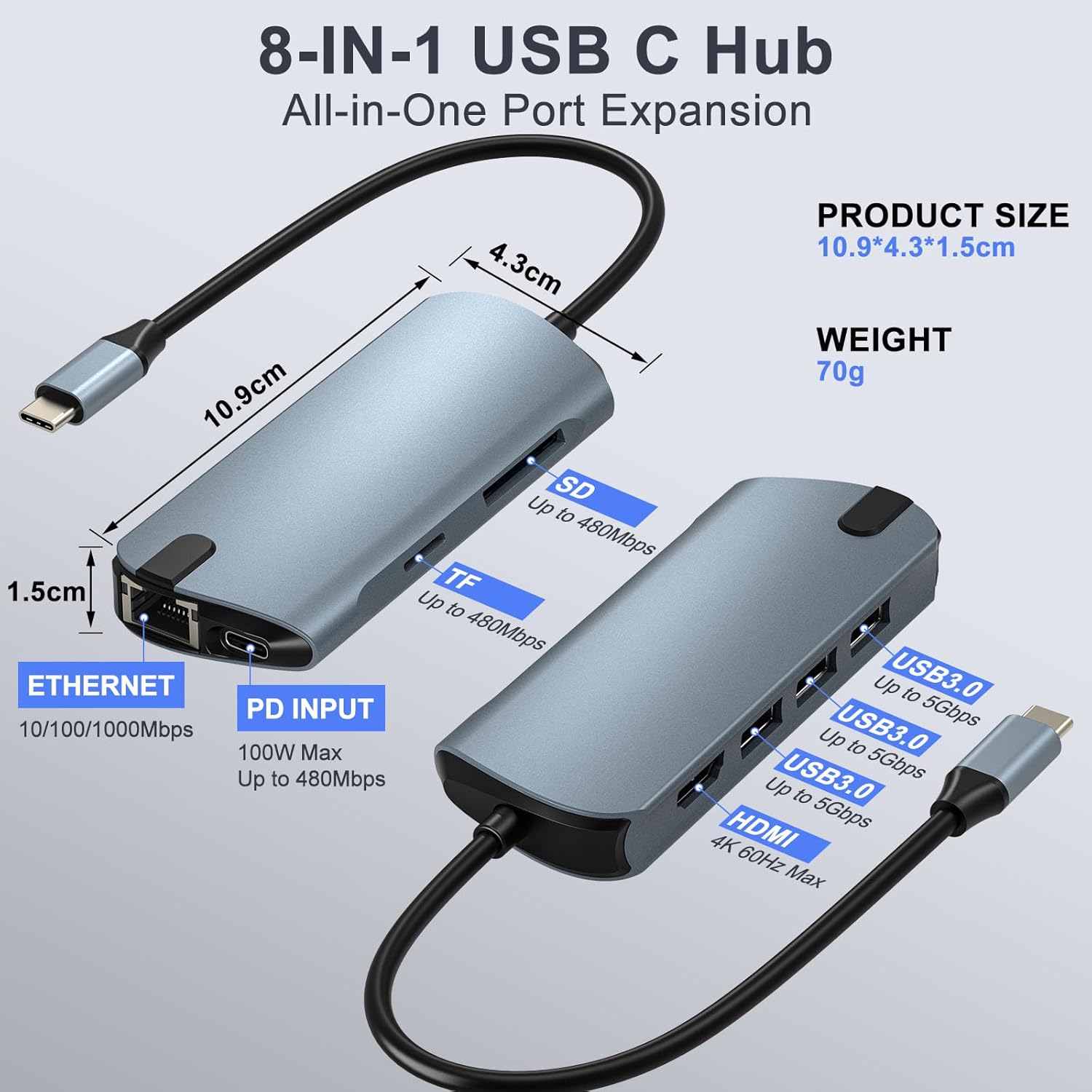
8-in-1 Multiport Hub for Enhanced Productivity – Expand your laptop’s single USB-C port into 8 essential connections: 4K HDMI, Gigabit Ethernet, 100W PD charging, 3x USB 3.0 ports, and SD/TF card readers. Perfect for office, home, travel, online classes, and video conferences
Seamless 4K@60Hz HDMI Output for Ultra HD Clarity – Connect to external monitors or TVs and enjoy stunning 4K Ultra HD resolution at 60Hz refresh rate. Ideal for streaming, presentations, multitasking, and detailed work with crisp, fluid visuals
Stable Gigabit Ethernet & High-Speed USB 3.0 Ports – Ensure a reliable, wired internet connection with the built-in 1Gbps RJ45 port for smooth video calls and fast downloads. The three USB 3.0 ports offer 5Gbps data transfer for quick file backups
100W Power Delivery Charging & Simultaneous Operation – The USB-C PD input port supports up to 100W pass-through charging for your host laptop, keeping it powered while all other hub ports are in active use without performance drops
Versatile Card Readers & Broad Compatibility – Built-in SD and microSD (TF) card slots allow easy photo/video transfers. Compatible with MacBook Pro/Air, Dell XPS, Lenovo, HP, Surface, and other USB-C laptops/tablets
6 reviews for 8-in-1 USB C Hub Ethernet Adapter with 4K@60Hz HDMI, 100W PD Charging, 3X USB 3.0 Ports, 1Gbps RJ45, SD/TF Card Reader, USB C Adapters Compatible with MacBook Pro/Air, iPad Pro and More Laptops


Amazon Customer –
Compact and practical design.
This adapter has a slim and compact design, making it easy to carry in a backpack or even a small pouch without taking up much space. The body feels solid and well built, with a gray metallic finish that conveys durability and a clean, modern look. In hand, it feels lightweight and well assembled.The short integrated cable is flexible yet firm, with a well reinforced USB C connector that feels secure when plugged in.When it comes to the ports, the layout is clear and comfortable to use. The three USB ports are well aligned and allow multiple devices to be connected without getting in the way of each other. The HDMI port, Ethernet connection, and card readers are arranged in an orderly way, making daily use easy without having to constantly rotate the adapter.One thing I find especially practical is that I used to have separate devices for each type of connection, and now it is a relief to use a single adapter with all these ports. This not only saves space, but also simplifies the workspace and makes it more convenient when connecting and disconnecting accessories.A detail that is truly appreciated is the ability to keep everything connected at the same time. It allows working with an external monitor, charging the device, and connecting several accessories without complications. The card readers are also useful, especially when working with photos or videos.Overall, this is a comfortable, well designed, and easy to use adapter, ideal for anyone looking to expand their laptop’s connections without hassle. Its size, materials, and port layout make it a functional option both for desk use and for taking on the go.
Jeff W. –
Turns My Laptop Into a Desktop with One Cable
I use my laptop as a “desktop” computer when I’m in my home office, and this USB-C hub has been a great solution for simplifying my setup.On a typical day, I’m running dual monitors, using wired Ethernet, connecting a full-sized keyboard (especially handy at tax time for the numeric keypad), and a mouse instead of the touchpad. I also occasionally use a card reader for photos or to load firmware images onto microSD cards for device updates. On top of that, I often charge my phone while working.Yes, all of this can be done by plugging my peripherals directly into the laptop—but that quickly turns into a mess of cables. This multi-function hub handles everything through a single USB-C connection and essentially functions like a compact docking station.I have it connected to my 120W PD wall adapter, and it powers my laptop, charges my phone and runs all my peripherals at the same time without any issues. Even under load, the hub only gets slightly warm—never hot.Overall, this is a very cost-effective and practical solution. It keeps my desk uncluttered, reduces cable swapping, and makes it easy to disconnect my laptop when I need to take it on the go. Highly recommended for anyone looking to streamline their workspace.
JL Avis –
Full 1Gbps. Doesn’t require separate power, but will charge a phone if it has it.
I use this with my galaxy s23 ultra phone. It instantly works with mouse and keyboard plugged in by USB, the card reader works great, the HDMI enables Samsung Dex (external monitor), and the Ethernet connection is, as it claims, up to 1 Gbps. AND it can charge the phone while all this is plugged in! Its not “super fast 2.0” but it is fast. Right now my phone has 53%, it says 58 minutes to full with this. My super fast 2.0 charger says 41 minutes, for comparison. However, it doesn’t need to be plugged in to operate, you can use it with your phone or laptop without giving it power from the wall! Functionally, it works better than I expected.It has an anodized aluminum finish, with a short robust feeling cord. Just a small led indicating it is plugged in. Good minimalist design despite the many ports on it. Easy to slip into a pocket or backpack.Definitely recommended if you need this type of mini dock for a phone or laptop. Great for travelling!
Thogar –
Compact, Well-Made Hub, Great Assortment of Ports
First off, I dinged one star because there are no instructions included with this versatile hub. I know it can take input power to allow for powered ports and all, but when I took it out of the box I wasn’t 100 percent sure which port to use since there’s no labeling indicating which is the charging input port. I had to refer to the online listing to confirm that the USB-C port on the end was, in fact, the one to plug into a chargin brick. Once that was sorted, though, it was smooth sailing for this port. I plugged it into my laptop and the system recognized all the ports and I’ve been using it without any problems since the day it arrived. The metal body on this very small and slim port is designed to last and the compact port provides an array of useful ports in the smallest form factor imaginable. Overall, this is a wonderful value on one of the most versatile USB hubs I’ve ever seen, it could just use a bit of documentation or, preferable, better labeling of the power input port.
James Ryan –
It works great!
This 8-in-1 USB-C Hub with Ethernet card reader is a great addition to any computer bag. It allows the use of SD cards, as well as TF cards.Because of the USB-C port on the end next to the ethernet port, you can keep your laptop, iPad Pro charged.It works as a smaller alternative to using a docking station for your laptop.It provides good value for the amount of money these cost.These appear to be high quality.
Bill –
Convenient All-in-One USB-C Hub
I use this hub in the office laptop, The overall quality is very good, and performance is solid across the board. Data transfer speed, Ethernet connection, and HDMI output all work smoothly with no issues.This hub is truly all-in-one and very convenient , HDMI, USB ports, SD/TF card reader, Ethernet, and PD charging are all included in one compact device. It helps keep my desk clean and reduces the need to carry multiple adapters.No need setup., Plug and play, stable connection, and works well with my laptop.Overall, I’m very satisfied and would definitely recommend it .