


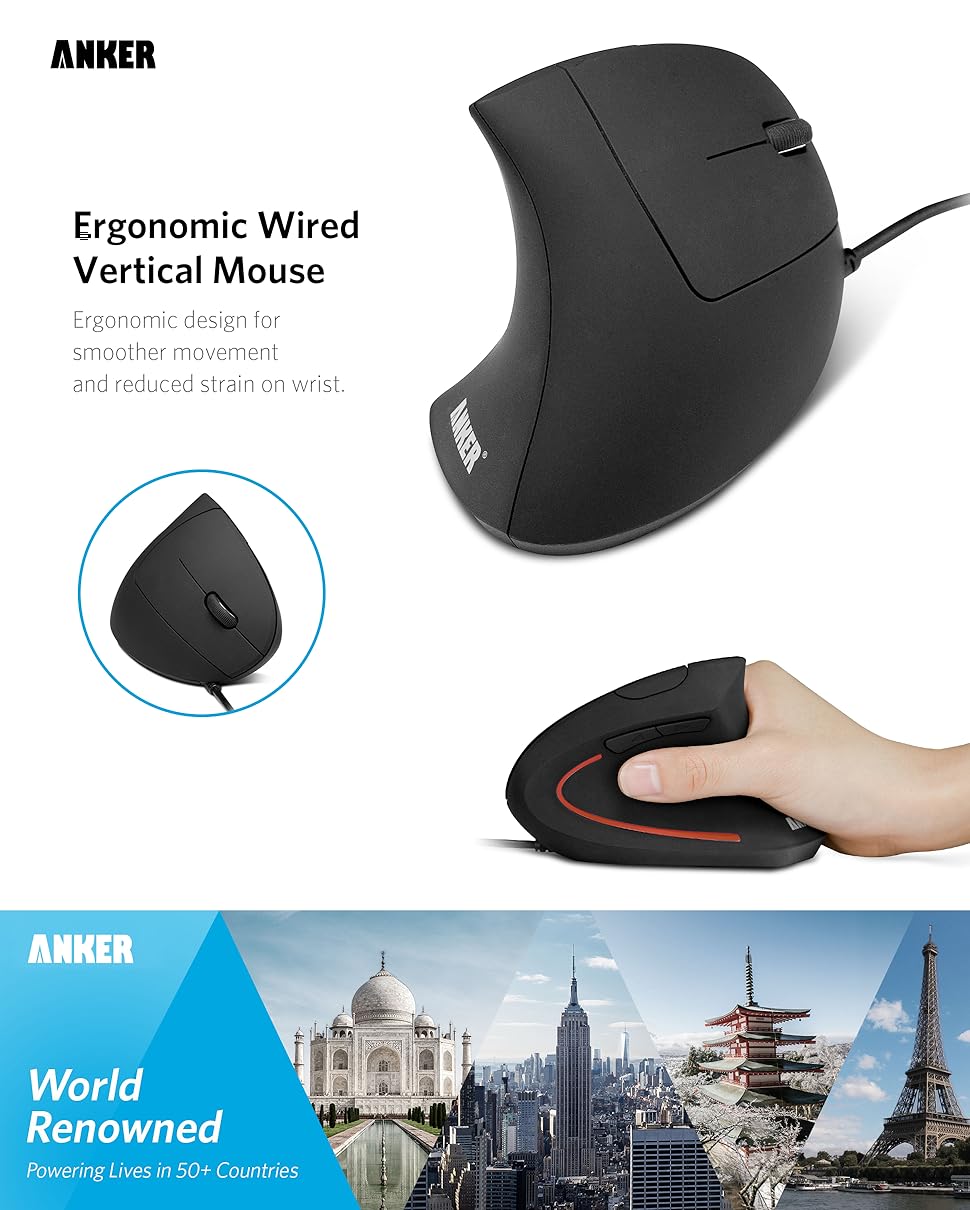
Anker USB Wired Vertical Mouse, Ergonomic Design Mouse for Computer and Laptop, 5 Buttons, 1000/1600 DPI, Optical Technology, USB Corded – Black
Original price was: $25.99.$16.99Current price is: $16.99.


Product description
–
Comfortable and classy.
Tired of using the traditional grip? Take a break from overly-clunky or uncomfortably tiny mice. The ergonomically-designed thumb rests and grips fit the contour of your palm for maximum comfort.
Sleek and Sexy.
Turn heads with a futuristic design. Made for increased functionality and comfort, this mouse combines a handshake grip with a easy-access buttons and two levels of mouse sensitivity for improved tracking.
Easy-access use.
Five buttons give you improved control over your computer’s systems. Whether dragging and dropping, selecting large volumes of data, or casually gaming, this mouse provides a low-cost, effective solution for multiple computing needs.
Compatibility:
Windows 8 / 7 / Vista / XP / 2000
Linux
Mac OS X (The previous/next page thumb buttons are not recognized on the Mac OS X.)
Note:
*This product does not use post-consumer recycled materials or bio-based materials.
Ergonomic Comfort: Experience the comfort of Anker’s Ergonomic Mouse, designed to support a natural “handshake” wrist and arm position. This reduces strain and promotes smoother movement, making it a smart choice for extended computer use.
Enhanced Sensitivity: Experience precision like never before with our 1000/1600 DPI Resolution Optical Tracking Technology. This wired ergonomic mouse offers superior sensitivity compared to standard optical mice, ensuring smooth and precise tracking on a variety of surfaces to boost your productivity and computing experience.
Effortless Navigation: Navigate webpages with ease using the added next/previous buttons. This ergonomic wired mouse is not only ideal for internet surfers but also for gamers and professionals who spend long hours on the computer.
Compact and Lightweight: The Anker Vertical Ergonomic Optical Mouse, with its 1.5m/4.9ft USB cable and dimensions of 120*62.8*74.8 mm, offers a lightweight design of just 5.3 oz, ensuring a comfortable and convenient user experience.
Customer Value: Our package includes 1 Anker Vertical Ergonomic Optical Wired Mouse (with 4.9 ft cable), and a detailed instruction manual. 18-month warranty .
11 reviews for Anker USB Wired Vertical Mouse, Ergonomic Design Mouse for Computer and Laptop, 5 Buttons, 1000/1600 DPI, Optical Technology, USB Corded – Black


anonymous –
Never wanted this thing! but unexplainably satisfied….
This is the first vertical mouse I have ever purchased. I was absolutely uninterested in vertical mice, however I suffered some pain in my wrist (playing video games with my nephew lol) My wrist was clicking and had some unusual discomfort. It was suggested that I try a vertical mouse for computing so I bought this mouse because the price was affordable for a item that I truly did not want and planned to use for a few weeks only. (some of the other brands that i compared to this are 89-120 dollars!)In a nutshell… i may never go back to a traditional mouse? In just a week or two i became used to the awkwardness and i new did bring out my other mouse. I still am using this Anker vertical ’98anwvm-ba’ mouse even as i type this review. I have used it for about everything imaginable from browsing to word processing and even for gaming! I was so amazed that it was so comfortable for playing games. Now after owning it feel silly for even thinking it may not work as well for games, after all it is a mouse in every respect and functions as well as any good mouse I have ever owned. I have been using it now for about 6 months and it still seems like new. I spend more than 4 hours on the computer a day so I am sure that it is very durable.I really like this mouse and I am pleased that such a well constructed mouse is this affordable. The appearance is very nice and all the parts look and feel to be high quality parts. The buttons and scroll wheel and lighted accent of dim un-obnoxious light are all VERY well constructed and the mouse appears to cost 3-4 times its actual value.Here some redundant info that some people like to hear from a actual owner to be sure there is no misrepresentation:- The mouse is corded.- It has 5 buttons (not including the mouse wheel which is 3 function – rolls forward / backward / and presses down)left mouseright mouseforward browseback browseand one additional button that I never new about until just now when I looked at the mouse to write this section of the reviewbwahahaha ( i wonder if its a dpi select?) I am not sure what it does ill update this review when i found out. ohh as I play with it now i think itIS a dpi select but I am hesitant to say for sure because i just learned about it.- It emits a red light if you turn it upside down (used for tracking) it is not visible at all when using the mouse in its normal position.- The scroll wheel does feel like it has a textured roller mechanism when you roll it but it is almost completely silent when i use it in fact i thinkit could be easily be written in the product description that it has a silent scroll wheel.- There is a very attractive and very dim blue light accent that is only on the thumb side of the mouse which is very nice because it allows me tosee the mouse when i sit down at the computer but it does not send light in any direction across the room since it faces only the user. even in atotally dark room the accent does not cast enough light to even see the keys on my keyboard unless i quite literally touch the mouse to the keyI am trying to see.. this is important to me as I use the computer late at night I dont like extra accent lights to be disturbing to others in theroom.- Model number “98ANWVM-BA”Seriously this mouse is in the 15 dollar range and it is VERY VERY good quality, i suspect they find it hard to sell vertical mice so they lowered the price to attract customers? well it really worked on me and this is one of those great deals you should not pass if you are at all interested. i honestly don’t think you will be disappointed.
Fredself –
Gamechanger of a Mouse.
This was a gamechanger. My elbow was always in hurting after a day of work at the computer. But only after few days use of this mouse and pain was almost completely gone. Works so great bought one for all my computers.
David W –
Good quality mouse.
out of the box, worked flawlessly. very comfortable angle for wrist. Only thing for me is the material could be just a touch more “sticky/rough texture” ish to allow your hand not to slide off a bit. I guess I need to adjust my grip a bit more snuggly. Not a product issue; it’s just me getting used to holding a mouse and a much more comfortable angle. this item definately relaxed my wrist, hand and forearm immediately from the first use.
David de la Garza –
Super Comfortable and Great Design!
This Anker vertical mouse is extremely comfortable to use — the ergonomic design really helps reduce wrist strain, even after long hours at the computer.The blue light is gentle and not annoying, even in low-light environments, which I really appreciate. It feels solid, precise, and well-built for the price.
Patrick –
Great mouse.
Great mouse. It’s taking a bit to rewire my brain to get used to the vertical mouse, but it immediately felt more comfortable. I’ll never buy a traditional mouse again.One thing I would like to address though. The manual. It sucks, but that seems to be the norm now.
Hamtickle –
Good Ergonomics, Poor Scroll Wheel.
I bought this mouse in 2023 and have used it with a variety of PCs and Macs. From an ergonomic perspective, it has been great. The natural position of the wrist and hand have meant no pain or cramping which is great. The buttons are well positioned for left and right clicks. There is no lag (I have the wired version to avoid lag and I even run it through a USB hub – with no issues).My issue I have is the scroll wheel. It has never been good and is now getting worse. It is comfortably positioned and has a good tactile feel, but it “slips” and will spin without “grabbing”. This can be felt via feedback – no physical “clicking” or “grabbing” when you scroll, and of course, the screen does not scroll. It is hit or miss – and I am at a point where I need to replace it – I am not willing to continue scrolling pointlessly waiting for it to “grab” again.Not sure if this is a common problem for this mouse, but thought I would share my experience.My experience with Anker has been positive – the other products I have bought have all been high quality, which is why I bought the mouse. Alas, time to move on to a better mouse.
Lily –
The mouse gets a lot of use; I have to say it is quite comfortable once you get over the initial weird-ness of having the mouse this shape; I can deal with many more hours of computing before my hands feel stiff.
Amazon Customer –
Works great, bought it to ease the strain on my wrist and help with carpal tunnel etc, and i think it is helping. Takes maybe a day to get used to using a vertical mouse compared to the traditional mice.
Daniel Palacios –
Empecé a buscar alternativas a mi viejo mouse debido a que recientemente comencé a padecer síndrome del tunel del carpo. Escuché que este mouse era muy bueno en cuanto a ergonomía y pude comprobar que sí lo es. Si bien tardé un poco en acostumbrarme al modo vertical, he notado mejoría en mi salud (junto a un buen teclado, por supuesto) . Algo que particularmente me encantó es el botón para cambiar la velocidad del puntero, requiriendo el mínimo esfuerzo para mover el mismo, esto es muy útil, especialmente si cuentas con 2 monitores o más.
George –
Ich bestellte mir diese Maus aufgrund einer leichten Sehnenscheidenentzündung und aufgrund der guten Rezensionen hier auf Amazon.Kabelversionen von Mäusen bevorzuge ich immer aufgrund der geringeren Fehleranfälligkeit.Die Anker liegt sehr gut in der Hand, ist hochwertig verarbeitet, hat eine angenehm gummierte Oberfläche und reagiert sehr gut.Nach ein paar Minuten des Eingewöhnens kommt man auch mit dem Scrollrad zurecht, welches man nicht eindrücken, sondern nach oben drücken kann für einen Mittelklick. Das Scrollen selbst läuft gut und das Rad rastet in etwas größeren Schritten ein. Die rechte und linke Maustaste sind sehr angenehm zu bedienen; mehr kann ich dem nicht hinzufügen.An der Innenseite der Maus (also der Daumenablage) ist ein Streifen eingearbeitet, welcher bei USB-Verbindung blau leuchtet. Nettes Gimmick, sieht hübsch aus, allerdings muss ich die Maus nachts vom Rechner trennen, damit sie aufhört zu leuchten.Weiterhin befinden sich darüber zwei Tasten (vor und zurück), welche in einigen Programmen z.B. zwischen Tabs wechseln lassen.Noch weiter oben befindet sich eine sechste Taste, deren Sinn sich mir noch nicht erschlossen hat, vA, da man dort nur mit Krämpfen heran gelangt.Über die Tasten kann ich alles in allem nur Positives von mir geben; sie erfüllen vollkommen ihren Zweck.Zum Navigieren mit der Maus: es ist natürlich bedingt durch die andere Bauart etwas weniger präzise, damit zu steuern.Wenn man nicht zu schnell, pixelgenau arbeiten möchte, dann ist dies kein Problem. Möchte ich nun allerdings in z.B. Photoshop damit arbeiten, so wird das schnell etwas frickelig – ist allerdings auch möglich. Selbst Spiele habe ich damit ausprobiert. Der akutelle Tomb Raider war gut spielbar, auch wenn das anvisieren in hektischen Situationen manchmal nicht auf Anhieb gelingt. Hier hätten es vielleicht auch Gewichte und Einstellungen für die dpi getan.Vom Preis-Leistungs-Verhältnis ist diese Maus auf jeden Fall weiter zu empfehlen, hatte ich mit ihr doch keine Komplikationen, was mein Handgelenk anbelangt. Sie erfüllt also vollstens ihren Zweck!Für ein Nachfolgemodell würde ich mir allerdings ein Faser-ummanteltes Kabel wünschen. Diese gummierten Kabel bleiben dauernd an Tischkanten hängen und man kann sie schlechter entknoten. 😉
Thibault Tresca –
had wrist and forearm strain from using a regular dell mouse all day every day, this mouse seems to have fixed this problem, position is much more confortable and natural than your regular stock mouse, however there is a learning curve, took me a day or two to get used to it.one thing that bothers me a liiittle bit in my early stage of using this mouse is that you cant really perform fast clicks when typing on the keyboard and just wanting to click elsewhere real quick, you’re gonna need to grab the thing and then click, but that’s just how a vertical mouse is, nothing against ankerOne thing i’m annoyed with is that the middle button is wayyy too hard to press considering that you’re not pressing against the desk anymore but “pinching” the mouse with your handI would have wished for this mouse to have silent clicks, but well..