


EPOMAKER X Aula F75 MAX Wireless Mechanical Keyboard with TFT Screen and Knob, Gasket Gaming Keyboard in 75% Layout, Hot Swappable, RGB Backlight, for PC/Mac/Linux (Black Gradient)
Original price was: $82.99.$66.99Current price is: $66.99.




Product description
The video showcases the product in use.The video guides you through product setup.The video compares multiple products.The video shows the product being unpacked. F75 MAX wireless keyboard Merchant Video
The video showcases the product in use.The video guides you through product setup.The video compares multiple products.The video shows the product being unpacked. F75 MAX mechanical gaming keyboard Merchant Video
 Tri-Mode
Hassle-free and wire-free, 3 connection style to meet all your needs in gaming and work.
 Anti-Ghosting
Register multiple keystrokes simultaneously, to be fast and accurate in the heat of the game.
 One-for-All
Compatibility with Android, Windows, Mac, and Linux, built for cross-system gamers or office clerks.
 Macro/RGB/Settings
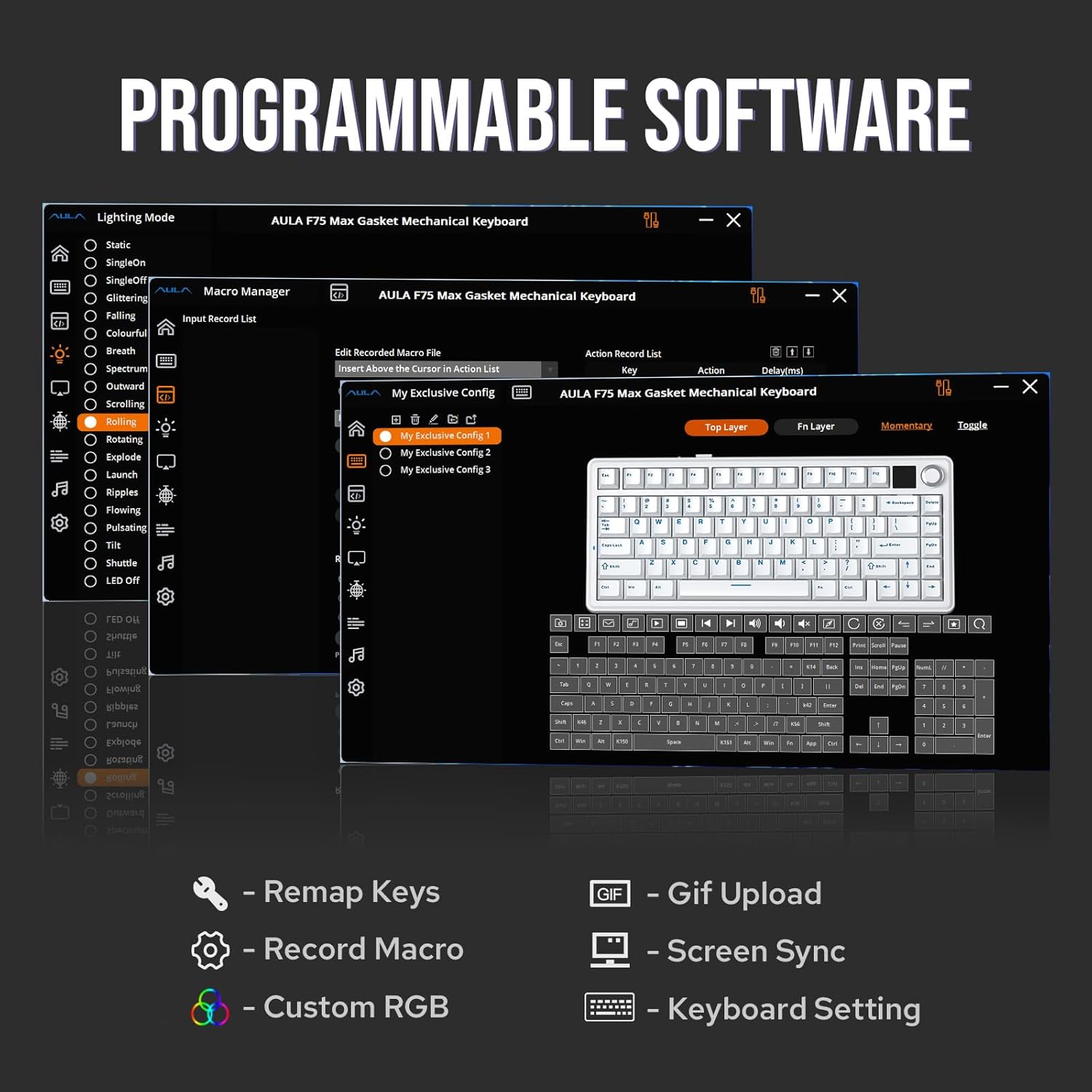
For efficiency or accessibility, the software (WIN only) lets you remap and configure as needed.
 Premium Preinstall
Well-lubed Reaper Switch with Light Diffuser and Plate-Mount Stabilizer for buttery smooth typing.
Versatile Wireless Gaming Keyboard with Custom Software
1 2.4GHz/Bluetooth/USB 2 Anti-Ghosting 3 PC/Mac/PS4/5/Switch 4 Programming Software 5 Lubed & Tuned
 Satisfying Sound
Rich and pleasant, without shake, shock, hollow or pin-noise, thanks to 5 layers of foams and Pads.
 Adjustable KickStand
Keyboard Dimensions: 32.8*14.3*4.4cm. Weight: 0.96kg.
 Intuitive Indicator
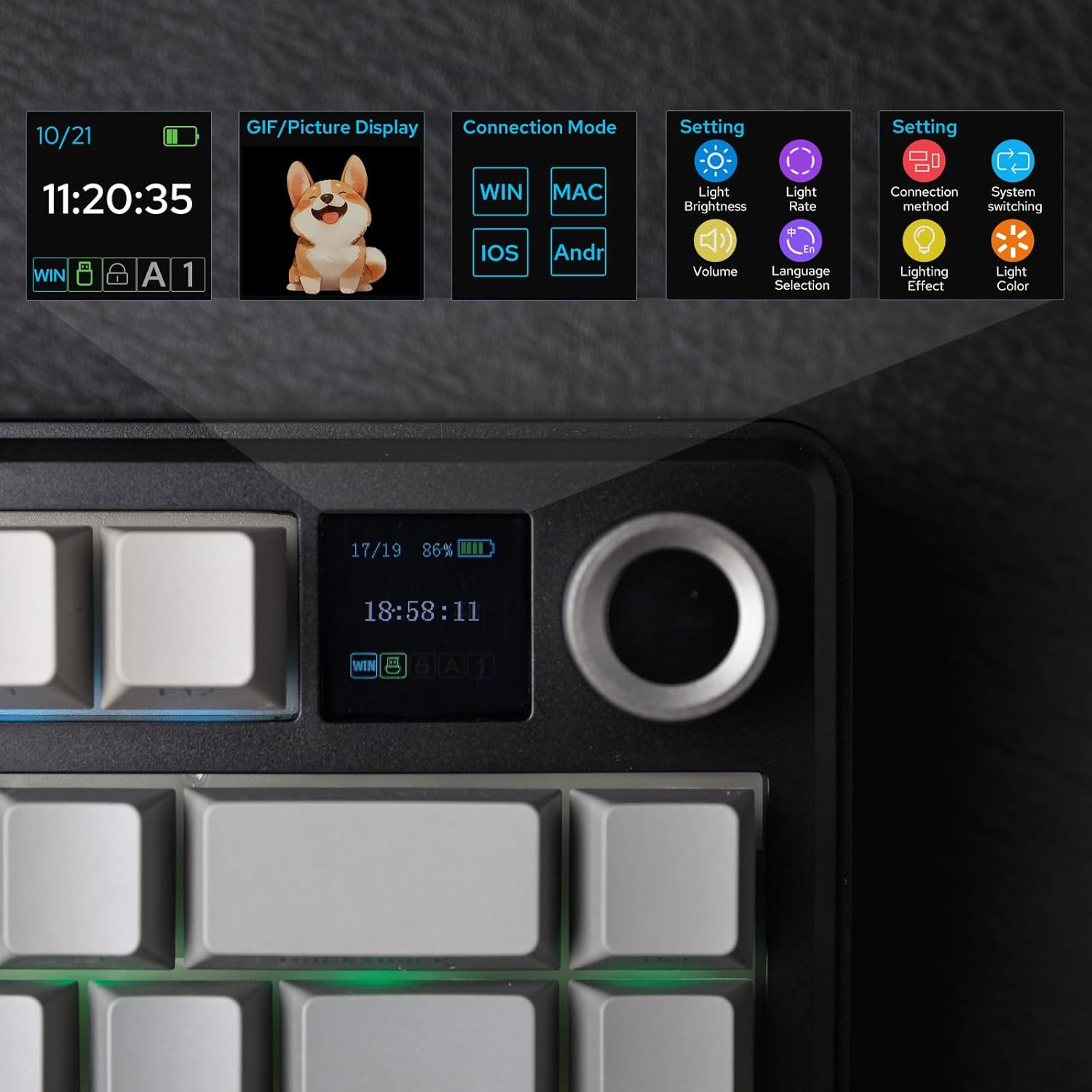
While the screen showcases CapsLock, WINlock, and Numlock, the 2nd Indicator is much more intuitive.
 Rechargeable Battery
5 minutes of no activity, the keyboard will sleep to save power. Check the screen for battery info.

Compact in Size, Full in Functions
1 Gasket-Mount 2 75% Form Factor 3 CapsLock 4 4000mAh 5 Hot-Swappable
Showcasing Sound, Software, RGB Backlight, Connection & Package LEOBOG Reaper Switch Finely Lubed & Tuned
Indulge in the creamy, smooth melody of F75 MAX, composed by the rhythmic thud of every keystroke. Factory lubed and tuned, the stabilizers and linear switches sound as incredible as they feel, with the right amount of creamy and thockey combined.
LEOBOG Reaper Switch: 5-pin Linear switch with Light diffuser. Force: 45/55gf. Travel: 1.8/3.6mm.  Windows System Only Programming Software
Configure as your needs call for, with the powerful software that supports individual key remaps, macro recording, combo editing, RGB adjustment, sensitivity setting, and more.
Tips: To connect to the software, please keep the keyboard wired and in USB mode. Search “F75 MAX Software“ to get access.  South-Facing Per-Key LEDs Custom RGB Backlight
As personalization is our core branding, our F75 Max isn’t shy in the realm of customization. With south-facing per-key LEDs and light diffusers on the Reaper switches, the RGB Backlight shines brightly with dozens of pre-set dynamic effects, adjustable in color and style via software, screen, and shortcut.
FN+\|=Light Effect;FN+TAB=Light Color; FN+↑↓←→: Brightness and Speed.Or, use FN+Knob to Get Knob into Screen Mode for Customization.  Triple Mode, Triple Convenience
Immerse in continuous gaming sessions with no debuff from low-battery nor interruptions from charging, and relish in the versatile compatibility of the F75 MAX keyboard that connects to up to 5 devices simultaneously.
1st Time Pairing: 1). Toggle mode switch to BT or 2.4G. 2). Pressing FN+Q/W/E or FN+R until the flash quicken from slow to rapid. 3). Connect on PC or plug dongle to PC.Connect to Paired Devices: 1). Toggle mode switch to BT or 2.4G. 2). Tap FN+Q/W/E or FN+R once.  Package Content
1* F75 MAX Mechanical Keyboard1* 2-in-1 Switch-and-Keycap Puller; 2* Extra Switches1* Detachable Cable; 1* 2.4Ghz wireless dongle (stored on keyboard)1*Quick Start Guide; 1*Multilingual Manual 
How can I toggle the screen with knob? How to turn the volume up/down with knob?
The dual-function knob can be used to toggle volume or the screen. Press FN+KNOB once to switch between these two modes. Once knob is in screen mode, you can turn the knob to slide through pages and press the knob to confirm.
What’re the meaning of all the signs on F75 Max’s screen?
The info page on the screen has 5 signs at the bottom telling keyboard’s status. From left to right, each of them means: Mac/WIN layout, keyboard’s connection status, WIN-Lock, Caps-Lock and Num-Lock status.
Does the F75 MAX keyboard have RGB Backlight?
Yes the F75 MAX Keyboard support dynamic and still backlight in individual colors and RGBs. The White and Purple keycaps are not shine-through, but the Black keycaps are.
Is the F75 MAX keyboard good for Mac?
The F75 MAX keyboard is compatible with WIN, MAC, Android and Linux Systems. The software is only available for Windows system, but keyboard has on-board memory so the settings saved can be used on other systems.
75% Layout Gaming/Office Keyboard from EPOMAKER
Add to Cart
Add to Cart
Add to Cart
Add to Cart
Add to Cart
Add to Cart
Customer Reviews
4.8 out of 5 stars 1,106
4.7 out of 5 stars 106
4.5 out of 5 stars 106
4.6 out of 5 stars 197
4.7 out of 5 stars 4,286
4.6 out of 5 stars 5,192
4.6 out of 5 stars 440
Price
$66.99$66.99
$68.05$68.05
$73.09$73.09
$79.99$79.99
$58.64$58.64
—
$83.60$83.60
Material & Color
Plastic; Black/Purple
Plastic; Black
Plastic; Green/White
Plastic; Black/White/Blue
Plastic; Black/Purple
Plastic; Blue/Black/Green
Aluminum; White/Black/Blue
Switch Types
Linear
Linear, Silent Linear
Linear
Linear
Linear
Linear
Linear
75% Layout
QWERTY US
QWERTY US
QWERTY US
QWERTY US
QWERTY US
QWERTY US
QWERTY US
Keys+Knob
81+1
80+1
82
84
81+1
80+1
82+1
PBT Keycap
Cherry Profile
Cherry Profile
Cherry Profile
Cherry Profile
OEM Profile
Cherry Profile
Cherry/MDA Profile
Connectivity
Bluetooth/2.4G/USB-C
Bluetooth/2.4G/USB-C
Bluetooth/2.4G/USB-C
Bluetooth/2.4G/USB-C
Bluetooth/2.4G/USB-C
Bluetooth/2.4G/USB-C
Bluetooth/2.4G/USB-C
Battery
4000mAh
5000mAh
8000mAh
4000mAh
4000mAh
4000mAh
4000mAh
Hot Swappable
✔
✔
✔
✔
✔
✔
✔
Backlight
Per-Key RGB
Per-Key RGB
Per-Key RGB
Per-Key RGB
Per-Key RGB
Per-Key RGB
Per-Key RGB
OS System
Win/Mac/Android/iOS
Win/Mac/Android
Win/Mac/Android/iOS
Win/Mac/Android/iOS
Win/Mac/Android/iOS
Win/Mac/Android/iOS
Win/Mac/Android/iOS
Software
F75 MAX Driver (WIN)
EA75 MAX Driver (WIN)
EPOMAKER 3.0 Driver
QMK/VIA Software
AK820 PRO Software (WIN)
F75 Driver (WIN)
Epomaker Galaxy70 Driver (WIN)
Special Feature
Interactive Screen
TFT Screen & Silent Version
Joystick & Screen
Fully Configurable QMK/VIA
0.85″ Screen & Volume Knob
Last 40+ hours with RGB
1.8kg Solid Aluminum
Compact Size, Function Core: With 80 programmable keys and a customizable screen, the F75 Max upgrades from its successful predecessor EPOMAKER X Aula F75 with equal reliability and incredible new functions. Revel in the convenience the volume knob offers and enjoy the Gif-showing screen that makes Backlight customization fun and easy. With connectivity, battery monitor and indicator lights combined in one, the F75 Max keyboard with TFT smart display will be your inseparable helper and productivity booster in gaming and life
Stylish and Ergonomic: Say goodbye to wrist strain and finger fatigue, as this Cherry-profile keyboard becomes your ergonomic assistant in browsing the digital world. With the 2cm-low front height and a 2-stage adjustable kickstand, typing angle can be as high or low as your comfort calls for. The Gasket-Mount structure separates F75 Max’s PCB from its shell to rid the harsh bottom-out, while the flex-cut PC plate gives it extra flexibility for soft and soothing typing
Satisfying Creamy Sound: Indulge in the creamy smooth melody of F75 MAX, composed by the rhythmic thud of every keystroke. Factory-lubed and tuned, the stabilizers and linear switches sound as incredible as they feel, with the right amount of creamy and thocky combined. Full of foams and silicone sandwiched between plate, PCB and bottom case, noise caused by echo within the keyboard is eliminated, while the IXPE switch pad and PET pad highlight the mellow switch sound that’s rich and pleasant
Versatile Gaming Keyboard: Game in style with this anti-ghosting keyboard that performs stably without double chattering or mistype in BT, 2.4Ghz wireless and cable mode, with 1000hz polling rate in USB and 2.4G modes. Its support of NKRO allows gamers to input multiple keys simultaneously, handy in FPS and Rhythm Games, while its compatibility with Android, Windows, Mac and Linux is valuable for programmers and clerks in the office
Custom Keyboard with Compatibility: As personalization being our core branding, our F75 Max isn’t shy in the realm of customization. With south-facing per-key LEDs and light diffusers on the Reaper switches, the RGB Backlight shines brightly with pre-set dynamic effect, adjustable in color and style via software, screen and shortcut. The hot-swappable F75 MAX comes with plate-mount stabilizers but is compatible with 3/5-pin mechanical switches and screw-in stabilizers for experimenting typing feel and sound, while the software offers key remapping and macro editing for efficiency and accessibility
11 reviews for EPOMAKER X Aula F75 MAX Wireless Mechanical Keyboard with TFT Screen and Knob, Gasket Gaming Keyboard in 75% Layout, Hot Swappable, RGB Backlight, for PC/Mac/Linux (Black Gradient)


Matt L –
Great keyboard with many options
Outstanding keyboard with multiple connection options. The keys have a nice feel to them, providing good feedback with a nice sound which will not bother anyone in the area.The keyboard has a nice weight to it keeping it in place on a sliding keyboard drawer. The lighting options and key programmability are nice pluses, along with the wheel and small screen, but what makes this keyboard great is the solid functionality.I did find the lack of a dedicated ‘Home’ key surprising, and using the wheel to control speaker volume requires pressing on it first, but these are very minor compared to the solid performance.The keyboard also looks good and seems very sturdy and dependable.Recommended and a good value, I like this more than the options from well-known premium brands.
YFZ450 –
Aula X75 Max
The Aula X75 Max is an impressive keyboard that punches well above its price point. The switches feel buttery smooth with satisfying, clean clicks that make both typing and gaming a pleasure. There’s no harsh rattle here—everything feels well-tuned and solid right out of the box.The RGB lighting is bright, vibrant, and evenly distributed, with plenty of effects to choose from. It really pops without looking washed out or cheap. The keyboard also has a nice, substantial weight to it, so it stays firmly planted on the desk and feels durable and premium.A big plus is the accompanying software. The app is easy to use and offers solid customization for key mapping, macros, and RGB settings without feeling bloated or confusing. Setup is quick and painless, even for someone new to keyboard software.Overall, the Aula X75 Max is a fantastic all-around mechanical keyboard—smooth typing, great lighting, sturdy build, and good software support. Highly recommended for anyone looking for quality without overspending.
Jonathon –
Crispy Outside, Creamy Inside — The Keyboard Croissant! 🥐
Setup & First Impressions 💻Connected seamlessly to my MacBook, Mac Mini, and two external monitors without any driver nonsense. The TFT screen shows useful info like battery life and which device you’re connected to — not just pointless eye candy.The Creamy Thock Revolution 🎧These factory-lubed linear switches are absolute perfection. Deep, creamy thock that sounds expensive without being obnoxiously loud. The gasket mount gives it this premium bounce that makes every keystroke feel intentional. I found myself typing random sentences just to hear that satisfying sound — my Slack messages have never been so verbose.Ergonomic Reality Check 🧘♂️The Cherry profile and low-profile design eliminated wrist strain I didn’t even know I had — this thing actually makes typing comfortable. The volume knob is surprisingly addictive — no more fumbling for media keys like an amateur.The Typing Test ⌨️Decided to test this beauty properly. Fired up a monkeytype… see video for conclusion.107 WPM, First attempt. The smooth, pre-lubed switches genuinely helped — less finger fatigue, better flow. “Ooooo” indeed!Bottom Line: 5/5 Stars ⭐⭐⭐⭐⭐The F75 MAX transformed routine typing into something actually enjoyable. Hot-swappable switches, multiple connectivity modes, and that creamy thock make it worth every penny. For the price it’s hard to beat!✅ Recommended for: Anyone who types more than emails and appreciates quality❌ Skip if: You’re somehow satisfied with mushc
Jeremy –
Incredible Value
Given that I had been using a membrane Razer keyboard for the last several years, my expectations for a keyboard were pretty low. This F75 MAX blew me away. The fit and finish is excellent. Although the body is plastic, the board is study and has some real solid weight to it. The RGB looks crisp, the typing sound and feel is incredible and acts like a high end custom keyboard. Despite the software being a little jank, I uploaded a goofy little GIF file to the screen and it saved it to the board itself, along with some key remaps functions that I did. You are able to make the changes you want without having to keep software running the background. Long story short, this is an incredible value board and is great for someone who wants a high end typing experience, but isn’t fully committed to spending the money on a fully custom keyboard build.
K. Benli –
The screen
The weight, quality, sound are great. The little screen that comes with the max model is pretty useless, stick with the lesser model. You can’t make it default to volume even though thats the only useful one, the rest of features you can change in the software. The rgb light is nice and as bright as you want it to be. The wireless mode is good, no noticeable latency but that little screen ugh resets everytime it goes to sleep.
CB –
Feels great typing, sounds amazing, 3 connectivity options long battery life
Just a fantastic keyboard. Works wired, BT, or even wifi… the battery can get through a workday of typing with no issue. Such a nice sound too. Interesting keycaps where the letters shine through the side instead of the face.BT was the only time I had any connectivity issue, but my desk is covered in peripherals and usb hubs etc. Something between it and the host didnt get along and I would get drop outs.Moving all my crap, aka clearing my desk, resolved the issue, but I feel like it is worth mentioning. Use cases potentially being on the go and/or in high entropy environments…It has been durable, no keys wearing through, they all respond as expected. It still sounds amazing. It feels buttery smooth. I haven’t notice issues gaming or anything where I felt latency was an issue, but again that pesky BT was the only time that I even jad a thought about something not registering.I used to think Razer made nice keyboards… I was lost.
Kindle Customer –
This keyboard goes well and above all of my expectations, it looks great, sounds great and more importantly feels incredible.I was skeptical about all of the features on a mid range keyboard, but it delivers on all of them.The software can take a minute or two to get used to, but I had no issues with it and the keyboard connected instantly.
Douglas Bewiahn –
This keyboard is very good and the sound of the keys is incredible, they really feel “creamy.” So far I have had a great experience. The key response is excellent and even my wife, who does not know much about keyboards, complimented the sound and the typing feel.The battery life is relatively good. It is hard to measure precisely since some days I use it more and some less, but with RGB on static at maximum it lasts around three days. The volume knob is very sensitive and it is nice that you can change the keyboard configuration with it and the small screen. I am not very demanding when it comes to settings so I installed the software when it arrived but I do not really use it. I configure everything I need with the knob.One drawback is that if you leave the screen on any menu other than volume and you want to quickly change the sound, you need to turn the knob to the volume menu, click it and only then adjust. This is not very practical. I prefer to keep the screen on the main page where it shows battery and time, since I like to know if the battery is running low. For volume I usually just use Windows controls or a shortcut.Another thing I regret is choosing the version with side-printed keycaps. I thought I would like it and adapt, but I did not enjoy it very much. Still, it does not affect the use of the keyboard, especially since I do not need to look at the keys while typing. This is my first time using a keyboard with side-printed legends. I have always used mechanical keyboards from brands like Razer or Logitech. My last one was a Razer BlackWidow that I used for four years and only replaced because I spilled coffee on it and some keys stopped working.I was hesitant to try a less well-known brand, but I am positively surprised. How long it will last only time will tell. After almost a month of use I am very satisfied and I recommend it. If anything changes I will come back to update this review.
w –
het werkt goed maar soms glitched het uit dode hoek ( ik speel op ps5 misschien daarom?) het stopt met werken daarom kan ik alleen met kabel spelen.
Yahya rajab –
Verry good product
Emanuel –
Está increíble, fue todo lo que pensaba de este teclado.En cuanto se abre la caja el teclado se siente de una excelente calidad premium.La batería le dura aproximadamente unas 14 horas con rgb, sin rgb la batería baja muy lento.Tiene buen alcance y no noto mala latencia en cuanto a los modos inalámbricos.El sonido es espectacular en cualquier tecla.Tiene estabilizadores en las teclas de espacio y las demás teclas largas lo que provoca una experiencia de tacto excelente en cada una de las teclasMi opinión con el software de personalización es relativamente bueno. Pude poner un gift fácilmente, cambiar los modos de iluminación con este método es fácil pero me confunde al querer personalizar macros o cambiar las teclas.Otra cosa no tan buena es la perilla, siento que tiene mucha sensibilidad y tienes que mover con mucha precisión cuando te mueves por el menú de la pantalla, pero si tienes paciencia funciona.Un plus es que está excelente que venga con un dust cover para cuando no lo utilice.