


AiRA XR/AR Glasses with 160″ 45°FOV 120Hz 5000 Nits, Myopia Adjust, Ultra-Wide Resolution Video Display Glasses for iPhone 17/16/15, Steam Deck, ROG, Switch, Mac, PC, Android & iOS, White
$249.89



Product description


Men Women Entertainment AR/XR Glasses

Men Women Entertainment AR/XR Glasses

Men Women Entertainment AR/XR Glasses
1 Versatile Using 2 Immersive Experience 3 TV Mode Everywhere
The video showcases the product in use.The video guides you through product setup.The video compares multiple products.The video shows the product being unpacked. ar xr glasses Merchant Video
Clip-on Sunglasses AR/XR/VR Glasses with Black
 Clip-on Sunglasses AR/XR/VR Glasses with White
 Clip-on Sunglasses AR/XR/VR Glasses with Blue
 Clip-on Sunglasses AR/XR/VR Glasses with Orange

A Massive 160″ Virtual Screen with a 45° Field of View: Turn any space into your own private theater. THIИKAЯ AiRA XR glasses deliver an expansive virtual display that feels like watching a 160-inch screen from an ideal viewing distance. With a wide 45-degree field of view, crystal-clear ultra-wide visuals, and an ultra-smooth 120Hz refresh rate, every scene feels immersive and lifelike—whether you’re watching movies, gaming, or exploring new digital experiences.
Stunning Micro-OLED Display with Precision Stereo Sound: Built for high performance, these smart display glasses use an advanced Micro-OLED screen and a custom optical engine to deliver rich contrast and true-to-life color. With brightness levels reaching up to 5,000 nits, visuals stay crisp and easy to see—even in bright lighting. Dual built-in stereo speakers provide clear channel separation and balanced audio, pulling you into an immersive, premium audio-visual experience.
Ultra-Light 63g Comfort with a Personalized Fit: Designed for effortless wear, these smart AR/XR glasses weigh just 63 grams and feature soft, adjustable nose pads for a secure, comfortable fit on most face shapes. Built-in myopia adjustment (typically 0 to –6.00D) lets many nearsighted users enjoy crisp, clear visuals—no prescription lenses needed.
Instant Plug-and-Play with Broad Device Compatibility: Your giant private screen is ready in seconds—no apps or setup required. Simply connect via USB-C and start using it right away. Compatible with iPhone 15, 16, and 17(except iPhone Air and iPhone 16e), iPads, most DisplayPort-enabled Android phones, Steam Deck, ROG Ally, as well as Mac and Windows PCs. Note: (Direct USB-C connection requires DisplayPort output support. HDMI devices require an adapter or hub.)
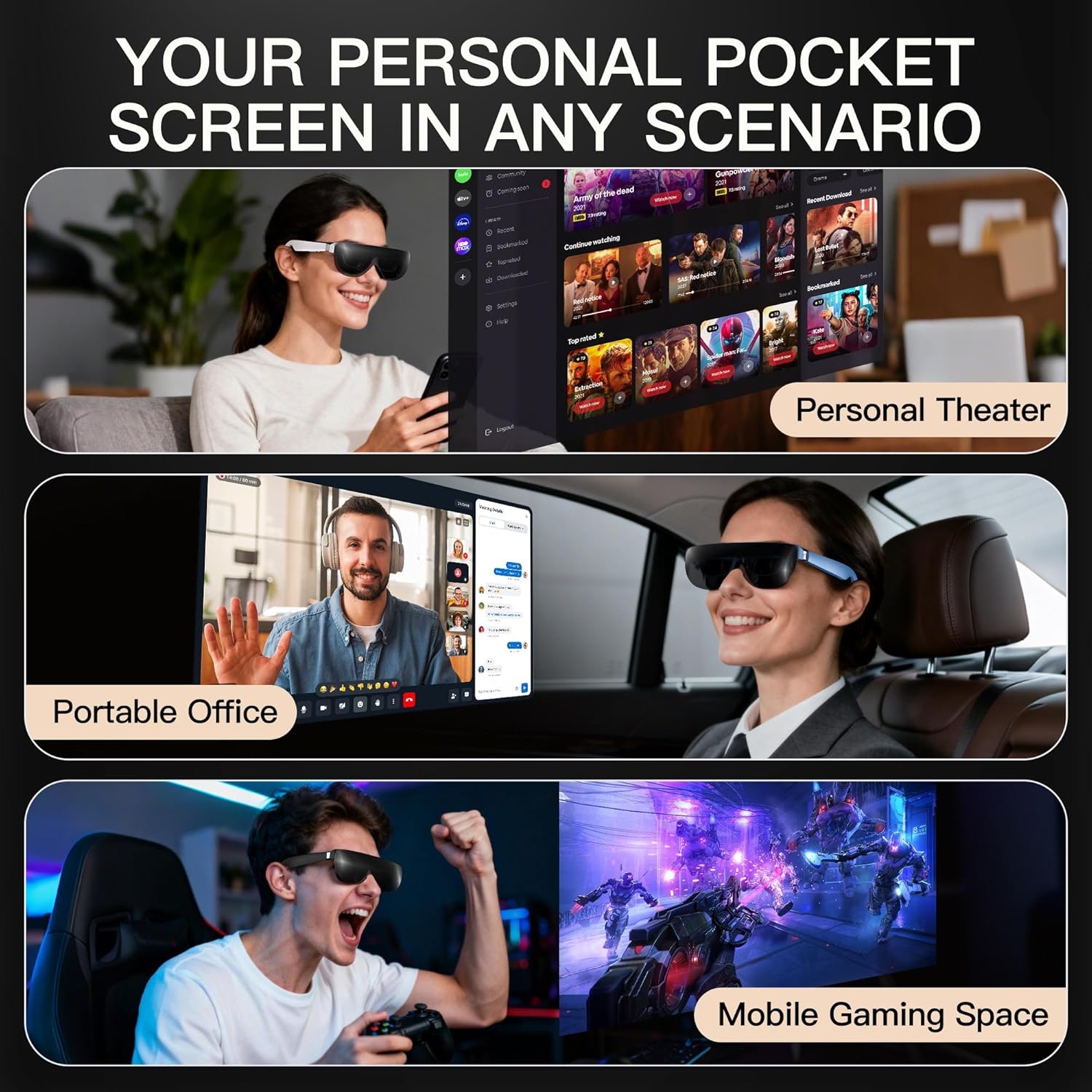
Your Portable Big-Screen Hub for Work and Play: Turn any space into your personal productivity and entertainment zone. ThinkAR AiRA delivers a massive private screen wherever you go—perfect for focused work on a flight, immersive gaming at home, or watching movies in a café. With support for both 2D and 3D content, it gives you a versatile, large-screen experience without being tied to a desk. Enjoy true mobility without compromising screen size or performance.
Pre and Post Support: We deliver end-to-end assistance for your AR glasses. Prior to choosing, our team is available to provide timely, accurate information about features and performance if you have any doubts. Afterward, we continue to support you with prompt responses to any concerns or technical questions; usually within 12 hours, along with thorough, easy-to-follow instructions. We are committed to ensuring a smooth, hassle-free experience with reliable professional support throughout.
6 reviews for AiRA XR/AR Glasses with 160″ 45°FOV 120Hz 5000 Nits, Myopia Adjust, Ultra-Wide Resolution Video Display Glasses for iPhone 17/16/15, Steam Deck, ROG, Switch, Mac, PC, Android & iOS, White




Kerry Huang –
Excellent
The display quality is excellent—the colors are amazing and the brightness is impressive. No manual is needed; just plug it in and my iPhone screen instantly appears. It works perfectly with both my wife’s iPhone 17 and my iPhone 16 Pro Max. I have to say, this is really cool. There’s no need to turn on the power—just plug in the cable and it works.The myopia correction feature works well for me; otherwise, I would need to wear contact lenses.Compared to Xreal and other more expensive products, the price is very reasonable.The speakers are just okay—don’t expect too much in terms of sound quality.
Ram1996 –
Doesn’t work with my Motorola Edge 2022
Works with my laptop. I can’t get it to work with my Motorola Edge 2022. The reason I bout it was to work with my cell phone.
Ken Saltzman –
Great video glasses — but not AR, not “smart” and with some issues
There is a lot to like about these glasses…especially at the price. And then there are some issues that need to be mentioned.First of all, let’s get one thing out of the way first — I do not consider these “smart” or AR glasses. It’s a mobile screen. There is no camera. No tracking. It has some weak voice features, but they don’t really change that fact.Let’s start with the good—SCREEN OVERALLThe screen image is great. Super bright. Sharp…all the way to the edges. Colors look correct. Contrast is good. Works great as a movie screen or as a computer monitor. So if that’sPLUG & PLAYAs long as your device outputs video and power from a USB-C port, you can simply attach the cable and it will work. Works great with my iPhone 16 and Microsoft Surface 3 (which is 5 years old.). There is no battery in the glasses. So it only works by attaching a USB-C cable (which turns it on automatically.)REFRESH RATEI can confirm that the stated spec of 120hz screen refresh is correct. On a computer, you will have to select that rate in your display settings. Fast movement looks crisp.SCREEN SIZEI believe the stated specs are correct. I get a lovely 120” screen from 12 feet, which I believe is the ultimate viewing distance. But yes, at 8 feet, it’s 160”. Regardless, it’s perfectly large enough.3DYou can easily switch from 2D to 3D and back, and with the correct media, it looks great. Just realize, you will almost surely have to adjust the image size to look good. I recommend using a player like VLC, which is free and makes that process very easy.MYOPIA ADJUSTMENTGreat that they included this. Very helpful (as long as your vision is within the range it can accommodate.). Very easy to dial in the sharpest picture.Now the issues —THIS IS NOT 4K!**update ** – Originally the listing said these glasses were 4K. I suggested they change that and it appears they have. But when I bought them, I was excited to get 4K for so cheap. I’m glad it’s correct now.NO 3DoFI realize the listing makes no mention of 3DoF, but the manual (which I looked at before I bought these) does. Most glasses in this price range don’t have this feature, so I’m not that disappointed. It would have been nice to have, but not critical.AUDIOIt’s OK…if you are in a quiet area where the sound bleed won’t be bothering other people. But the volume and quality of the audio from those tiny speakers takes away from the whole “movie theater in your glasses” experience. You’ll need some decent buds if you want to get lost in the experience.CLIP ON SHADEBetter, but not great. Absolutely necessary when outdoors during the day, but even with them, a lot of light still gets in. They darken only…they do not black out. I wish they had included another clip on which did. If you are coming from a VR experience (like me) …so much light is hard to get used to.FIT AND ADJUSTMENTthere’s not a ton you can do to make these more comfortable, or make the screen perfectly centered. The nose pads bend, and the temple hinges outward a bit. That’s it. There is no up and down adjustment. They feel okay. But after a movie, I definitely want to take them off.THE APP AND VOICE CONTROLThis is a weak offering. The app is quite basic and I have not gotten the voice control or “AI” features to work that well.ALL IN ALLThis new company has made a very decent pair of video glasses for a good price. If that’s all you are looking for — a big, good-looking screen right in front of you — then I think you’ll be pleased with these.
Kendall –
They just don’t work.
They have sound, but the display does not work really disappointed the only reason you would even want them I will be returning them
Slade –
Best budget glasses on market
Here’s a normal persons review. These are amazing glasses for the price you just can’t complain. It honestly surprised me how crisp the video comes out I was not expecting that and they also sound good as well I’ve been looking into them for a while but others are just so expensive and these do the job just as good would definitely recommend.
Jared C. –
AVERAGE – In my own opinion.
Surprisingly, the video quality is excellent. I have set the brightness at 80 percent, and it’s impressive. However, some things need to be said as well.1. The volume is below average. You can adjust the volume on your input device, but even at max, it’s still low. I was expecting this to be bone-conductive, but it isn’t. There is one thing you can do to make the sound louder. You can cover with your hands or with something hands-free, such as cloth, caps, or head covers. Be careful, the sound will be louder, and you may not be able to hear your surroundings.2. Ear temples are a bit long; they stick out about half an inch. You can’t bend it or adjust it to fit your ears. You can’t tilt up or down, like other AR Glasses. If you wear it as it is, the screen size was covered by the Bridge or the top bar. I have to constantly tilt the glasses up so I can see the entire screen size.3. The plastic clip-on is not dark enough to completely darken the area. In bright areas, I have to fight with the bright light and the Sun. They should have added another clip-on, a darker one, to compensate for the screen.4. The manual is not comprehensive, and the instructions are lacking. At first glance, I was looking for a power button, but the glasses automatically turn on when paired with a device.5. The box is good enough to protect the glasses, but there is no cushion or soft styrofoam to protect from shaking or falling if an accident happens.6. The built-in myopia adjustment is a good addition.7. The 44-degree field of view is not an accurate feature.8. I tried a 4K video that I took to test if the advertising is correct, but to my surprise, it is probably a 2K or higher 1080 HD quality. The paper says a micro-OLED display may not be accurate.9. I tested the glasses with an iPad, an Android phone, and an Android tablet; they all work, but not on my HP laptop that I had purchased last year. It’s an Intel 9.10. I don’t know what that “Portable Office” is supposed to be for. It doesn’t have a camera or isn’t able to function as one.What’s in the box are a tiny screwdriver, an extra nose pad, a micro cloth, a plastic clip-on, and a single 3-foot USB-C cable.At $249.99, it’s not a reasonable price for above-average AR Glasses. My advice is to get better AR Glasses that tilt and can adjust to different face shapes.