


XREAL One Pro AR Glasses with X1 Chip, Native 3 DoF, X-Prism Optics, 3D Mode, 57°FOV 171″ 120Hz FHD Display, XR Glasses for iPhone 17/16, Steam Deck, ROG, Mac, PC, Android & iOS L (IPD 66-75mm)
Original price was: $769.00.$649.00Current price is: $649.00.




From the brand


Step into the new era of wearable display
Ushering in the next generation of user interactions that merge the physical and digital worlds.
XREAL’s mission is to make AR accessible for everyone with it’s line of AR glasses. XREAL self developed spatial computing chip, the X1 Chip pushes performance to the limit in a compact design and unlock native 3 DoF in your glasses, delivering a major upgrade for the XREAL One.


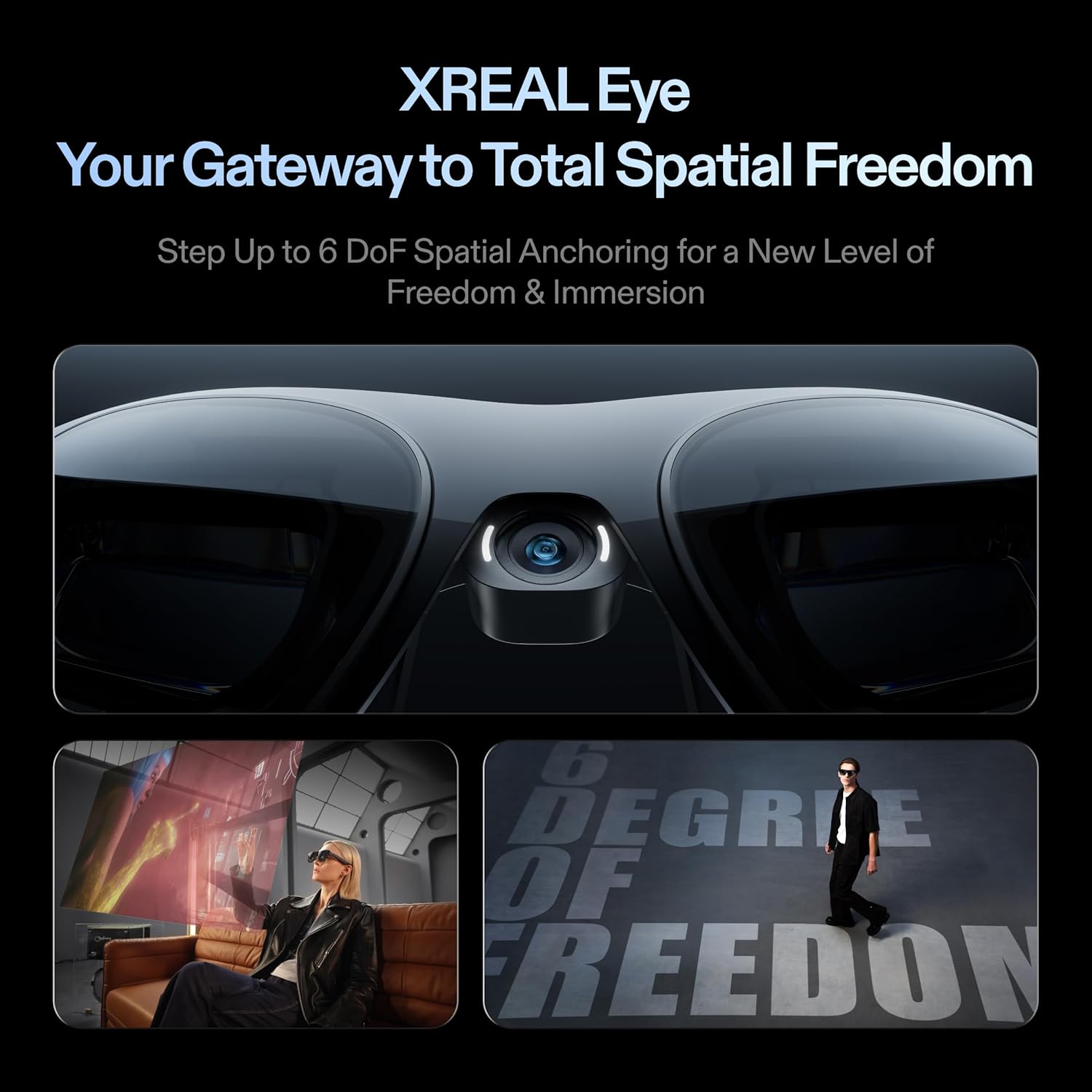
XREAL’s Self-Developed X1 Spatial Computing Chip: Delivers Native 3DoF tracking with ultra-low 3ms M2P latency, ensuring stable visuals even during rapid movements. With the optional XREAL Eye, full 6DoF spatial anchoring. It delivers high processing power, seamless compatibility with devices, and distortion-free visuals through advanced stabilization.
The New Optic Engine-X-Prism Optics: XREAL’s advanced lens and projection system—ultra-slim, precision-engineered optics that project a large, sharp virtual screen right in front of your eyes, while still letting you see your real surroundings clearly. With a best-in-class 57° FOV, Optic Engine 4.0 recreates the feeling of watching a massive 171-inch screen from four meters away—all in lightweight, compact design. Its advanced anti-glare design minimizes reflections and light interference, enhancing clarity and immersion.
Experience True AR with 6 DoF, Spatial Anchor Anytime: Pairing with XREAL Eye, anchor your screen anywhere in your room, so it stays perfectly fixed in place—even as you walk around, lean in, or change your position. Unlike 3DoF, which keeps the screen at a constant distance relative to your head movements, 6DoF keeps your virtual screen locked to a real spot in your space for true spatial freedom and a more natural, immersive AR experience.
REAL 3D – Turn everything you watch into an immersive 3D experience: REAL 3D Now Available on All One Series Glasses, instantly transforming all your content—from games and movies to apps and photos—into true 3D with a single switch. Experience richer depth and lifelike visuals across everything you watch or play.
57°FOV, 171” Spatial Screen – More Immersive Visual Experience: Experience a virtual screen starting at 171 inches wide, filling your view with blockbuster visuals, thanks to XREAL’s advanced optics and industry-leading 57° FOV. Powered by Sony’s 0.55′ Micro-OLED display technology and a smooth 120Hz refresh rate, get swept into your games or movies with immersion that rivals traditional home theaters—without the size, setup, or space concerns.
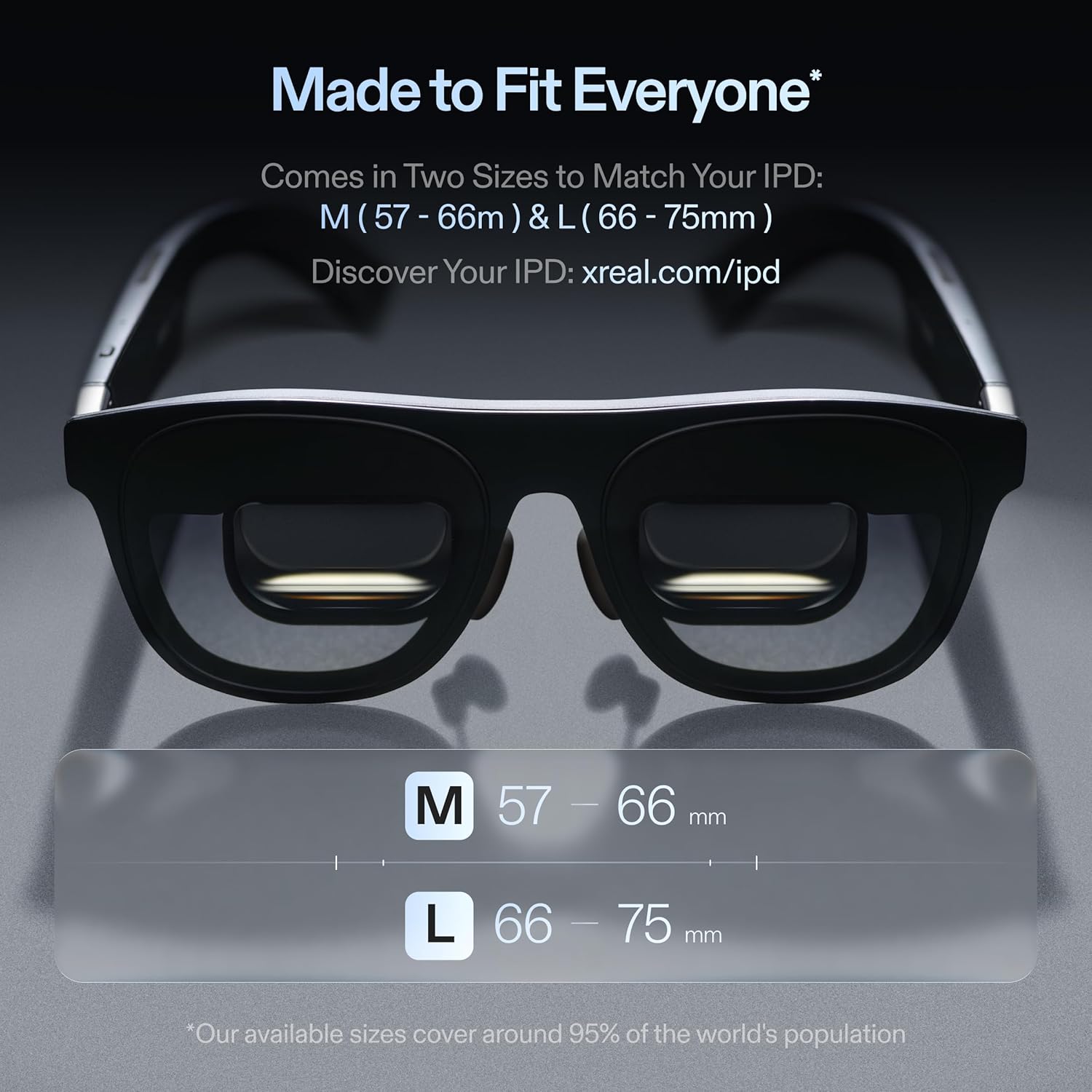
Dual IPD Design- Made to Fit Everyone: The XREAL One Pro is designed for comfort and clarity, offering two size options – M (57–66mm IPD) and L (66–75mm IPD)—to fit over 95% of users. Three-stage adjustable arms, zero-pressure nose pads available in three sizes, and a new spring hinge design adapt easily to different head shapes and sizes, ensuring a secure fit without any pinching or pressure. Additionally, with built-in IPD adjustment software, you’ll enjoy consistently clear, crisp visuals with minimal blurring or edge cut-off.
AR on Any Device, Anytime, Seamlessly: XREAL One Pro are compatible with any USB-C device capable of video output including iPhone 16/15, Android phones (supports DP output), Steam Deck, ROG Ally, MacBook, Windows PCs, and more. And paired with XREAL Eye, you can capture photos and videos instantly.
Audiovisual Mastery – Sound by Bose: XREAL One is fitted with a unique sound chamber design with new acoustic components, professionally tuned by Bose engineers. Enjoy high-quality audio without the need for additional headphones—whether you’re gaming, watching movies, or on a call.
Bright Sunlight? No Problem. Always See Clearly – Indoors, Outdoors, Anytime: With up to 700 nits of brightness, XREAL One Pro’s display stays crisp and easy to see indoors or under bright sunlight. Advanced electrochromic dimming lets you instantly adjust the lens tint, so you can stay aware of your surroundings or block out distractions for total immersion—putting you in control of your viewing experience in any environment.
Quick & Easy Settings Adjustments for Every Activity: Whether you’re switching from gaming to email or jumping from a movie to a meeting, quick one-tap controls on the XREAL One Pro let you instantly adjust brightness, display mode, screen size or distance—right from the glasses. Customizable shortcuts keep your most-used settings at your fingertips, so your AR environment can adapt seamlessly to whatever you’re doing next.
10 reviews for XREAL One Pro AR Glasses with X1 Chip, Native 3 DoF, X-Prism Optics, 3D Mode, 57°FOV 171″ 120Hz FHD Display, XR Glasses for iPhone 17/16, Steam Deck, ROG, Mac, PC, Android & iOS L (IPD 66-75mm)




John –
Amazing displays and well made product
I’m pretty much blown away by these. The display quality is shockingly good. Far better than I imagined. These are largely plug and play. My Ipad and my windows laptop just connect and work. The only issue I ran into was my primary PC doesn’t support USB out. Certainly not an issue for these glasses but something to be aware of based on what you want to connect them to.ProsWay more comfortable than I expectedDisplays are amazing — just amazingAudio is also better than expected but not as good as headphones or earbudsPlug and play simplicityConsThey sit further away from your face than I’d like. This makes them less discrete than I hoped. No one things your wearing sunglasses.
Stephanie J –
Nice product overall
The customer service was very responsive and resolved a few minor issues early on. Overall, the XREAL One Pro AR glasses have been a great experience. The image quality is very clear, with accurate colors, and the hover controls respond quickly, making them easy and convenient to use. They work well for watching shows, office tasks, and everyday use.The device is very lightweight, and even after long periods of wear, it doesn’t put pressure on my nose. I’m using the M size, which fits perfectly. The adjustable portable screen is a thoughtful design feature, offering a wide field of view and strong immersion. In addition, using it in non-VR mode doesn’t easily cause dizziness. Overall, I’m very satisfied with the purchase and would definitely recommend you all to try it.
AaronBrownSound –
#1 Absolute best AR glasses you can buy for productivity and gaming in 2026!
After trying a few glasses these Xreal One Pro glasses are the ones I’m keeping for productivity and gaming!The search is over and the XReal One Pro is my favorite. They finally do the thing I wanted AR glasses to do. Light weight, stable 3dof, clear image, without the typical birdbath glare, functional for productivity, gaming, and movie viewing. Now I can game, or work anywhere with excellent ergonomics. Nice to take a break from craning the neck forward with laptops and steamdeck gaming.Here are my in depth review notes for people who want more details:XREAL ONE PRO FIRST IMPRESSIONSRight away they are by far the best I’ve tried and great! Slick packaging too.Getting the lenses closer to my eyes seems to help with less aberration and less shimmer! It really matters where these are placed.Super stable 3dof! Rock solid.Interface is the same as the 1s and it’s excellent and intuitive.Ultrawide built in is just right. I absolutely love being able to sit up perfectly straight on my Macbook air with perfect posture, and have an ultrawide I can work with. Works great with steamdeck and iphone for movies without any tweaks.FAVORITE SETTINGS PRODUCTIVITYEar position: One click lower. Same as 1s.IPD 0 default. Measured 66.7 in apple “Eye Measure” app and no adjustment needed here.DISPLAY MODES:- Display mode Normal – Brightness 2-4 clicks down.- Display mode Vivid – Brightness 2-4 clicks down This mode seems to have less shimmer and ghosting and seems best for productivity with Ultrawide.- Full brightness is cool for a minute, but too bright for my eyes at 700 nits for inside use.- Higher brightness has more ghosting with heavily contrastedFor productivity I think I prefer the tradeoff of having anchored shimmer, but non abberation at focus point. When head is stable it’s stable and fine. Too much abberation in outer 50% for text and details.Widescreen – 285″, 4m, 32:9.QUICK BUTTON1. Click – Electrochromatic dimming2. Long – Ultrawide 32:93. Double Click – Real 3dAudio: Muted. I use my bluetooth earbuds (Airpods Pro 2, samsung galaxy fe)MOVIE SETTINGSAnchored, 162-171″, 4m162″ is all in view, 171″ is cool but anchored can hit edges with movement.Real3d in soft mode (can work and be cool)Wish there was a 167-168″… might be perfect.GAMING SETTINGSSo far one of two settings that seem remarkably similar overall.Anchored, 274″, 8m-9mFull visibility, low aberration, easy on the eyesAnchored, 154″ (137-171″), 4m137″ for full text clarity, full visuals in range and lower outer abberationBright Full or down up to 3 clicks when not dimmed.If dimmed bright down 2-4 clicks.3d doesn’t work well for gaming yet locked at 30hzNose pads:- Seem to not just affect overall position on nose, but overall visual experience as well.- Small- Seems to have an improved fit for me and better visuals while moving wide screen. Definitely try multiple pads to see if it improves aberration and how smooth anchored wide screen is while moving head around. These get a little closer to my head which gives an improved anchored widescreen experience.- Medium- comfy and close, but it almost makes the widescreen appear to bend as I move my head left and right.- Large- Feels even comfier, but visually feels odd for me and almost makes me feel the sea sickness.POSITION ON NOSE REALLY MATTERS!If productivity is a use, have text on screen when putting on the glasses and look at text in the lower bottom third. If they sit too high or low it warps the outer edges more. Position to reduce aberration, not too close, low or far. Seems best pulling the TOP of the frame against the upper nose bridge to get it centered and optimal visually then adjusting nose pads or swapping them out.AUDIO TIPThese actually work fine with my VSX headphones. It seems best to just use best position and put the earpads over the ear pieces and it still seals. May get hot over time, but didn’t notice in a 30 minute test session.I can put them in the mid or highest click position over the earpads as well. Need to test this more.Minor ConsiderationsChromatic aberration is very sensitive to note and eye position! With the slightly wrong position text outside the center for text in all modes. For me too close more aberration, too far more aberrations. Anything outside the center radius out of about 20% of the center has increasing amount of red chromatic aberrations. Need to try other nose attachments. Once I got it right it dramatically decreased so mess with this and try putting the top of the glasses in place first before it rests on the. nose.Shimmer when moving head with anchored screen. I adjusted to this much better than the 1s though and as long as my head is fairly stationary it’s fine. Vastly reduced with perfect positioning.Still some glare from internal screen in bottom of lens.Glare from behind me noticeable, but not terrible.Dimming isn’t quite enough to block a low incandescent light bulb and the pokes through my screen.Half dimmed emits a VERY quiet electronic whine from the right side of the glasses, but I only go full dim or not dimmed and it isn’t audible with earbuds in.Some halo/glow around high contrast areas when above 50% brightness.All that said, these are very minor things to note to be thorough. No AR glasses have all these things solved. Only VR has solved some of these details, but those weigh a ton more and aren’t portable at all. AR Glasses are lighter and easier to be used without being fully isolated so for me it’s well worth the trade off.IMPROVEMENTS?I might buy light blockers to put on them for side/rear when I do want it dimmed.Wish there was a 168″ screen just between 162 and 171″.It can be a bit confusing to find the best settings for functions at first, but now that I’ve found them it’s easy.Would be nice if the quick buttons had defaults like the ones I mentioned.Oh, and I’ve tried the Xreal 1s, and Rayneo Air 3s Pros but they didn’t work for me as well for glare, and other reasons. I consider stable 3dof, non birdbath glare, dimmable, build in ultrawide all a critical part of AR glasses and the XOP has them.I also considered Viture, but they aren’t yet 3dof stable, and I’ve heard from others the XOP has better clarity and color accuracy.
Kindle Customer –
❌ Overpriced and Full of Issues – Not Worth It
I had high expectations for the XREAL One Pro AR Glasses, but unfortunately, the experience has been very disappointing. There are several serious issues that make this product not worth the price:No App on the Apple Store: There is no official app available, meaning you can’t manage settings or make adjustments through an app, which severely limits usability.Frequent Freezing in Some Apps: In several applications, the image freezes as soon as it opens, forcing you to restart the device.Blurry Edges & Poor Image Quality: The picture quality around the edges is noticeably blurry, which makes it unsuitable for professional tasks.Not Suitable for Stock Trading or Work: The display performance is unreliable, making it a poor choice for trading, financial analysis, or any kind of precision work.High Battery Drain: When connected to your phone, the glasses drain the battery extremely quickly.Not Compatible with Dell Desktop PCs: I tested these glasses with multiple Dell desktops, and they simply don’t work.Overpriced for What It Offers: Paying this much just to get a slightly larger screen for watching videos is unreasonable.Overall, this product feels unfinished and underdeveloped, more like a beta version than a polished consumer device. If you’re looking for reliable AR glasses, I strongly recommend exploring other options before spending this amount of money.
Gabriel Morales –
Decent but still has many QOL improvements needed
ProsAllows a nice big screen without needing a monitor. Great for road trips and flights where space is limited.Doesn’t have a battery so no need for charging.ConsDoesn’t work with Switch 2 out of the box.Limited FOVFont can be pretty hard to read and tires my eyes quickly.Glasses get pretty hot over time.Tried all nose pads and the glasses keep slipping off. I wish the pads were not so smooth and had some grip to them.Notepad holders are incredibly fragile. I bent one out of shape and nearly broke it when switching out the nose pads applying minimal force.All in all, these will come in handy for my trips but still feel limited and uncomfortable for the price tag.
Glenn –
The One Pros are a significant improvement over the original nreal Air I’ve been using in combination with the XREAL Beam. It provides the same base functionality, with convenient tracking modes built into a button on the glasses. I’ve been using them for about a week at the time of writing this review.In addition to being the same base features as the Air + Beam combo without the bulk & duplicate cable, there are some notable upgradesReflections are no longer an issue when you wear bright (white) shirts or hoodies causing glare and discomfort. The One Pro’s optical solution is great in eliminating this effect.Increased FOV is nice in combination with the built in tracking. Rarely do I want to watch something full screen as then clipping would occur along the edges. I find a smaller screen is comparable to the Air’s FOV I’m used to and the smooth tracking is great with no edge clipping.The dimming feature is more useful than I thought it would be, especially when using it on the go. I would say it gets pretty dark, not quite 100% blackout but not bright enough that I want to 3d print a physical light blocker.My main usage has been watching media via an iPhone and being able to plug directly in without any adapter or Beam makes the whole package of the One/One Pro significantly better in usability.Some users say they run hot – in my usage they’ve gotten a bit warm after walking in the sun with them but nothing uncomfortable.One downgrade of note in my opinion is that you have to take out the cord from the glasses to fit it in the case unlike the airs.I think if you’re an Air + Beam user, these One Pros are worth considering if you have the budget.
Abdullah Nawaz –
Its not being connected to nebula app as rhe app is showung cinnect u r glasses where as the wire is still pluged in but still not responding where as in virgin store it was working
Tech Guru –
Good Products
Omar Alraisi –
I bought the Viture Luma Ultra before buying this and didn’t like it, so I returned it and ordered this. It’s night and day, the extra cost is 10000% worth it.
R. Harvie –
Great for tv, movies on the go – especially airplanes. We travel quite a bit – just returned from Calgary to Bangkok flights – between flying time and layovers, it was great to be able to watch tv and downloaded movies on my iPhone (get the VReal hub power and play – Asia flights do not permit use of power banks during flights). I had used my MetaQuest in}n a Europe flight this past spring – nice, but bulky and no peripheral awareness re meals, other passengers, etc.. highly recommend. Also – bluetooth connection doesn’t work on MetaQuest work with a few exceptions – with zero noise cancelling. Bluetooth with XReal via iPhone worked perfectly.Big screen, high quality picture results – in public, used with both bluetooth Sony ear buds and headphones. At home – in glasses speakers are excellent .