


Bluetooth Voice Remote with Keyboard, Air Mouse, Backlit, Rechargeable, 2.4G WiFi/BT5.0 Dual Mode, IR Learning – Compatible with Nvidia Shield, PC, Projector, Android TV Box, HTPC(G60S Pro)
$35.99


Product description


Highlights
– [2.4GHz&Bluetooth Dual Mode]
– G60S Pro BT Multi-Function air mouse with 2.4GHz and Bluetooth Dual Model, you can choose any mode when working.
– [Multi-Functions]
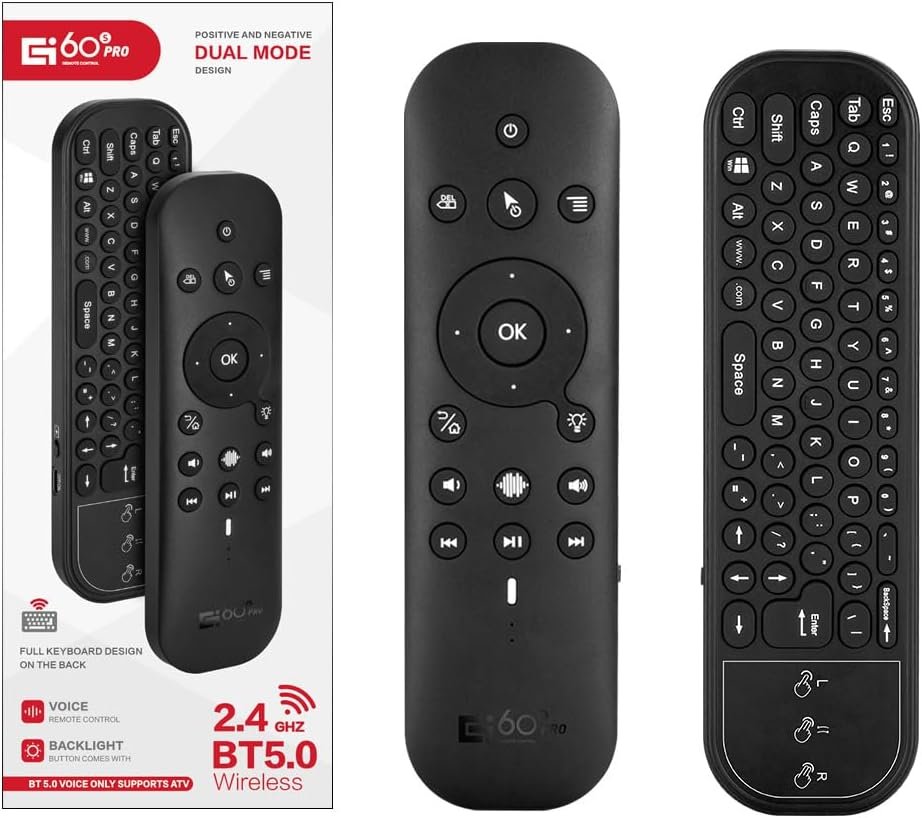
– G60S Pro BT with two sides, one side with , another side is wireless keyboard with 63 Keys and Touch Panel.
– [Google Voice Assistant]
– Google Voice search function. All you have to do is ask. Speak into the voice remote control and machine will search what you want. Ask for the best in action movies, today’s weather, or the latest celebrity news!
Notice:Google Voice Assistant Function only work in 2.4GHz model, not work when in Bluetooth mode.
– [Gyroscope Function]
-With 3-Gyro + 3-Gsensor, it’s more convenient to easy operate in horizontal and vertical mode.
-[ Backlight Function ]
-The backlight of laser engraving is clearly mapped to each charactere. When long press backlight button you can turn on /off backlight function.
-[ IR Learning Function ]
– The power button support“infrared programming function”, it is easy to set this function only two steps accordingto the user manual.
– [ Notice ]
G60S Pro BT Multi-Function Air Mouse Support TV Box, Projector, TV, MobilePhone, Rablet Computer, Desktop Computer, etcs., But it cannot compatible for Amazon Fire TV and Fire TV Stick, or some Samsung, LG, Sony, Mi smart TVand Mi TV Box.
General Specifications:
Transmission Method: 2.4G wireless and BT
Sensors: 6 Axis Gyroscope
Number of Keys: 80
Range: >10m
Battery Type: Li-ion Battery
Material: ABS Plastic and Silicone
Machine Weight: 90g
Packages:
1 X Remote Control
1 X USB Receiver
1 X USB Charging Cable
1 X Instruction
【Voice Input】Press the voice button on the remote control to easily search for your desired channel. With a built-in high-fidelity microphone, you can chat with friends or input words via voice. Please note that the voice search function does not work across apps like Alexa Voice Remote, and only works for the built-in voice input search box or apps(Google Assistant).
【Dual-mode Connectivity Widely Compatible】Our remote control has two connection modes: 2.4G wireless and Bluetooth 5.0. Compatible with all mainstream systems such as Windows, macOS, Linux, and more, you can use it to control more devices.
【Backlit Design and Touchpad】The mini keyboard features an LED backlit design for convenient operation in a dark room. The touchpad with multi-touch support and gesture functionality enables faster and more precise operation.
【IR Learning and Gyroscope】Built-in 6-axis gyroscope, the air remote can sense changes in direction and speed, allowing you to move it directly in the air for control. The 6-button infrared learning can replace your old infrared remote control.
【BUY RISK-FREE】Enjoy our unconditional 30-day money-back guarantee and lifetime after-sales service. If you are not satisfied with our Mini Wireless Keyboard, please do not hesitate to contact us. Your satisfaction is our aim.
13 reviews for Bluetooth Voice Remote with Keyboard, Air Mouse, Backlit, Rechargeable, 2.4G WiFi/BT5.0 Dual Mode, IR Learning – Compatible with Nvidia Shield, PC, Projector, Android TV Box, HTPC(G60S Pro)





P. F. Nguyen –
Perfect for working with my PC while sitting at my TV
I use this to control media, music and some light general purpose PC control from my sofa. The IR remote interface for the power button lets me turn my PC on (through a custom IR -> PC waking setup), then bluetooth lets me control normally using the mousing and keypad.I especially like the gyro mouse control. The touch pad is less satisfying to use, but very functional. Keyboarding can be a little annoying, but it works, the touch pad doesn’t have touch rejection while typing, so sometimes my cursor jumps due to accidental touches.USB C charging makes this a pretty great package. I charge maybe every 2 months. I don’t use the remote intensively for typing, but when I pick it up for brief mousing, or regular remote control, the battery lasts forever. No need to switch the remote off.
K. Jackson –
Worth the cost. Good product.
Got this for my on. He loves it!! Good quality, easy to use. No problems with connecting to all his gadgets. So far all gadgets have been compatible.
Mr. Ed –
Does not do what it says it does
I first tried the 2.4 ghz mode. That is what I really wanted the remote for. The device worked mostly fine but the ‘OK’ function produces no output in non-cursor mode. This is a big deal because I can use the cursor keys to navigate it an item just fine but I can’t select it. Well, I can turn the device over and press the Enter button but I am not going to.Next i tried to connect the Bluetooth. I put the remote in pairing mode but it never showed up as available on any of the multiple devices I tried. And there is no tech support anywhere to ask if there is something else to try
Ron –
Lacks Dedicated Home and Mute Buttons
I purchased this remote for use with my Android-based streaming device. Overall functionality is acceptable, but the lack of a dedicated Home button and Mute button is a significant design oversight.One of the buttons is labeled as “Home,” but it actually sends Android key code 4, which corresponds to the Back function—not Home. While repeatedly pressing Back will eventually return you to the launcher, this is not the same as a true Home command.A proper Home button should send Android key code 3. On Android devices, a true Home button also enables additional functionality such as double-pressing to bring up the recent apps overview (allowing you to manage background applications). This remote does not support that behavior natively.I was able to work around these limitations using button remapping software, but that should not be necessary for basic system-level controls.The hardware itself has potential, but from a usability standpoint, there is definite room for improvement in the button layout and firmware mapping.
Ryan –
Disappointed with Limited Functionality and Poor Instructions for NVIDIA Shield
I recently purchased the Android TV box remote control with high expectations, as its design appeared promising, featuring a full keyboard and other enticing features. However, my experience with this remote has left me disappointed and frustrated. While a couple of positive aspects can be found, they are overshadowed by significant drawbacks.At first glance, the inclusion of a full keyboard seemed like a great addition. However, my enthusiasm quickly waned when I discovered that the keyboard functionality is limited to Bluetooth and does not work with the 2.4G USB connection. This limitation hampers its versatility, especially when I needed to input text using the USB connection. It’s disheartening to have a feature that falls short of its potential.Another letdown is the remote’s IR programming. While it manages to work with the power button on my TV, it fails to extend its functionality to my soundbar. As soundbars have become commonplace in many households, this lack of compatibility is inconvenient. Instead of serving as a universal remote that simplifies our entertainment setup, I find myself juggling between two remotes, which defeats the purpose entirely.Furthermore, the setup instructions provided with this remote control are simply terrible. I spent an arduous two hours going through a trial and error process to get it to work. In this day and age, clear, concise, and user-friendly instructions are vital, especially for a product that aims to streamline our lives. Unfortunately, this remote falls short in providing adequate guidance, adding unnecessary frustration to the setup process.On a slightly positive note, the backlight function of the remote works fine, providing visibility in dimly lit environments. Additionally, the remote is appropriately sized, making it comfortable to hold and use during extended periods.It’s important to note that my experience is based on using this remote control with my NVIDIA Shield device. Compatibility issues may vary depending on the specific device used. Nevertheless, for a universal remote, broad compatibility across popular devices, including the NVIDIA Shield, should be a priority. Unfortunately, this remote control fails to deliver in that regard.Overall, the Android TV box remote control falls short of its promises due to limited functionality, such as the keyboard’s exclusive Bluetooth compatibility and the lack of control over my soundbar. The poor setup instructions added to my frustrations, making the entire process unnecessarily time-consuming. While the backlight and size are minor positives, they cannot outweigh the major flaws and inconveniences. Regrettably, I find it difficult to recommend this remote control, particularly for NVIDIA Shield users or anyone seeking a truly universal remote solution.
Jessie –
Recommended
Bf loves it, it’s a great deal for a great remote
James W. Schroeder –
Only can get power button taught to the IR feature
For the price, it works pretty well so far. The battery doesn’t last long, so don’t forget to turn it off at night. When the battery gets low, the cursor gets sporadic and when connected via Bluetooth, none of the buttons functions, just the Bluetooth. With the dongle, it works, but I can’t get it to learn anything on my roku tv remote other than the power button. It doesnt do anything when I try the voice command. It’s not worth sending back, but I’ll probably buy a nicer one eventually. I wouldn’t be surprised if it loses all functionality in 6 months anyhow. It works well enough for 35 bucks I suppose
tjh –
Works well – only one gripe
It works, it works well. It is intuitive and the air mouse can be calibrated on the fly so your aim and movement is correct.I purchased 5 of these after the first one for my business.The guy a few reviews below me throwing a fit because it doesn’t have right and left click – it literally has a pictured instruction printed directly on the mouse pad, one finger tap for left click, two fingers for right…..My one grip is that there’s nowhere to store the usb dongle when not in use so it makes it a bit less than ideal to travel with.
Ashille –
Should have gotten this years ago and it’d have made my TV experience so much better. Can’t believe that for so many years I’ve used the mediocre option of having to type using the annoying onscreen keyboard when easier options were there.First, let’s discuss the good. I’ve settled on this remote after having widely researched into other brands / models. I was very particular with what options I wanted. I don’t think too many people give a damn about their tv remotes but they should as we spend so much time watching tv and having the right tool, takes one’s tv experience to another level. I absolutely wanted a remote with minimal buttons and one that didn’t have the annoying Netflix and Amazon buttons. I can’t tell how many times I’ve accidentally pressed those stupid and clunky buttons in the middle of watching tv by just pushing the remote aside or just changing position on the couch. While one remote would have the feature that I was looking for, another model, would be missing another. This is the only option available in the market thus far that offers most of the features I wanted (one could want). It works flawlessly (almost) on android TV. It does everything the native remote does and in addition, has the capability for air remote, which is the main reason why I decided to upgrade my existing remote. However, since it also features a trackpad, I’m ending up using that option more than the air mouse. Now all of a sudden, too many option have become available as opposed to the original remote. The built in keyboard at the back really up the typing game. The voice feature works as good as the native remote as well. The backlit option works really well too. Whichever side of the remote is up, that side becomes active and lit up, while the bottom side deactivates, avoiding accidental typing.So much said, there’s a major design issue with the keyboard at the back. The trackpad is on the right hand side end, which means that the keyboard is not centred on the remote, which makes typing using both thumbs awkward. Maybe it has been designed to be held in one hand and using the index finger to type. Ideally, if the keyboard would have been split in half with the trackpad in the middle, it would have made holding the remote horizontally in both hand and typing using both thumbs, more comfortable and intuitive. A single button serves both return / back and home key. Short press is for return and long press is home. This is a bit annoying but not a deal breaker in itself. The position of volume up and down buttons also is different from traditional remote, which would require some rewiring the brain to adjust.However, this is still way better than having to use the dumb onscreen keyboard selecting letter by letter, only to find out that there was a typo mistake at the begging and having to erase everything and start all over again. Now I’ve just gotten a second one for my other tv, despite the design flaws, since no other models compare.
Shane –
It’s the best one I’ve used so far. Works great but has finally stopped connecting to the dongle after almost a year of use which sucks but I’ll be buying another one because every other one sucks
Mss –
I bought this remote to replace the stock remote for the Nvidea Shield Android box, purchased in 2018. This remote is night & day compared to the stock remote. First off, no batteries!!! That in itself says it all! It was mostly charged when it arrived. Tested it out & what a breeze to use compared to the stock remote, which was glitchy & overtly sensitive to touch. I love the keyboard, on-off switch to conserve power, mouse & backlight features on this remote. Finally I can see the buttons in the dark! Like common, why are these features not standard on all remotes?!I’m super happy with this remote being rechargeable & actually working. Buh bye Nvidea remote!!
Ethan –
I like the air mouse, keyboard, touchpad, and programmable IR buttons (which I had no problems setting up for TV power/volume using the skip back/forward buttons, and switching inputs on my HDMI switch using the menu button). I also like that it connects via Bluetooth OR 2.4g USB receiver, and in my case I want to control a PC as well as a Chromecast with Google TV, so it can connect to both.My only issue is that there is no way to manually switch between Bluetooth and 2.4g mode (that I know of). This means that in order to switch the remote between devices, I have to turn off the device I’m not wanting to connect. With the Chromecast there’s no easy way to turn it off so now I am having to use a wifi plug to cut the power, which then allows the remote to connect to my PC.Decent price for what is a (mostly) all in one solution for me which gets rid of multiple separate remotes.
Forrest –
This thing is a downgrade from my 5yr old $20 remote that doesn’t charge properly anymore and all the the buttons icons are rubbed off. Making it hard for people to use if they didn’t memorize the layout already. I bought this to replace it but I ended up going back to my old remote for 3 main reasons among nit picky things about the desing.The return/back button is combined with the home button. So in theory you’d press for return/back, and hold for home. Except on a windows pc, when you press for return it’s actually a right click and the little menu pops up. Which is useless because there is already a dedicated button for right click on the remote. On any browser holding for home doesn’t open a new tab on home page it takes your current tab and brings it to the home page which is also useless.The power button is way to easy to press by mistake shutting down your whole system, which it cannot turn back on so you need get up and turn it on manually. Defeating the whole purpose of a remote. Im lazy, I dont want to get up, thats why I bought this remote. Which is ironic because all the other button are not nearly as responsive sometime needing three four presses to actually work.To avoid mistaken button presses I just turn the remote off like I did with my old remote but the problem is my old remote paired instantly, this one take 8-9 seconds and when I’m trying to quickly rewind something I missed in a video it feels like a very long time.Finally, it just feels awful while holding it. The plastic feels cheap and unit just feels to light and hollow. Ive felt higher quality mcdonalds toys. Not to mention the shape, the front remote part is rounded but the back keyboard part is flat creating a sharp feeling edge that is just unpleasant feeling. Battery life is meh, range is good for a large room or basement.